12 Practical AI in Customer Service Examples
Support volumes keep rising while most teams stay the same size. Customers expect an answer within minutes, at any hour, on whatever channel they picked. That pressure is why more companies now hand part of the work to artificial intelligence, and the spending shows it. The global AI for customer service market was worth about $13 billion in 2024 and is on track to reach roughly $83.9 billion by 2033, a compound annual growth rate of 23.2%.
The twelve examples below are grouped by what they do, each with a real scenario and the mechanics behind it. Some resolve a conversation from start to finish. Others work in the background, tagging tickets, reading sentiment, or drafting a reply before an agent opens it. Every one of them runs in production somewhere today.
What Counts as AI in Customer Service
AI in customer service means using artificial intelligence to handle, route, or support customer conversations across channels like chat, voice, and email. It covers everything from a bot that answers a shipping question to a system that reads a customer's tone and flags the ticket for a supervisor.
It helps to sort these tools into three tiers because they behave very differently.
Rule-based bots follow a script. They match keywords or menu choices to preset answers and work well for narrow, predictable tasks. Ask something the script did not anticipate and the conversation stalls.
Conversational AI uses natural language processing to read intent instead of keywords. It handles phrasing it has never seen, holds context across a few turns, and replies in plain language. This is the tier most people mean when they say a chatbot feels smart.
AI agents, sometimes called agentic AI, are the newest tier. They take actions. An AI agent can look up an order, process a refund, or book an appointment, then confirm the result back to the customer. It carries a multi-step request from start to finish and pulls in a human only when the situation needs judgment.
When a vendor says AI "handles" a large share of interactions, that often means it triages, routes, or summarizes them, not that it closes them on its own. Handling a request and resolving it are different jobs, and several examples below assist an agent rather than replace one.
12 AI in Customer Service Examples Teams Use Today
Here are twelve ways AI shows up in real support operations. A few of these talk to customers directly. Most of the work happens behind the agent's screen, tagging tickets, routing them, reading sentiment, and flagging what needs a person.
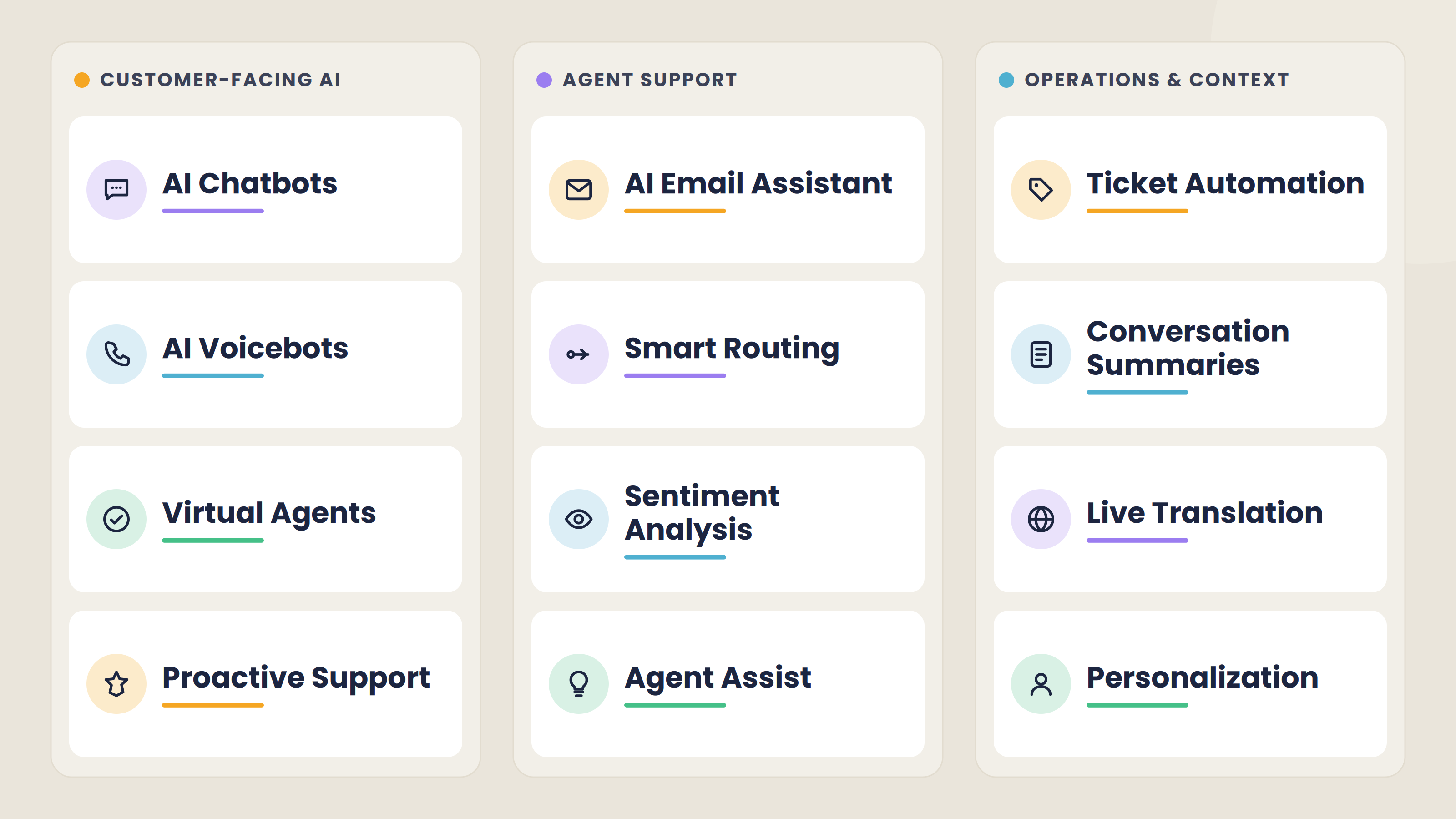
1. AI Chatbots for Instant Self-Service
The AI chatbot is the most common example, and the one customers meet first. It sits on a website or in an app, answers frequently asked questions, checks order status, guides a user through a return, and passes the conversation to a human when it stalls. A single bot can handle thousands of these chats at once, which is why it absorbs much of the routine workload.
The honest limit is resolution. Only 14% of customer service issues are fully resolved in self-service. A chatbot deflects volume and replies fast, but it works best when the handoff to a person is quick, and the agent can see the full chat history, since deflection without a clean escape hatch frustrates people.
2. AI Voicebots That Answer the Phone
Phone support carries its own friction. Calls arrive after hours, menus frustrate people, and long holds push callers to hang up before anyone answers. An AI voicebot answers on the first ring, understands natural-language requests, and handles routine ones on its own. It can check a balance, confirm an appointment, take a meter reading, or capture the reason for the call and route it to the right team.
The value shows up most outside business hours. A caller who would have reached voicemail at 9 p.m. gets an answer, and anyone who still needs a person is handed over with the details already captured, so the agent does not start cold.
3. Virtual Agents That Resolve Requests End to End
A virtual agent goes beyond answering. It completes the task. When a customer wants to change a delivery address, reschedule a booking, or process a return, the virtual agent verifies the account, makes the change in the underlying system, and confirms it back, all in one conversation. This is the agentic tier from earlier, and it is where the market is heading. By 2029, agentic AI is projected to resolve 80% of common customer service issues on its own, cutting operational costs by about 30%.
Scope is the constraint. A virtual agent is only as reliable as the systems and data it connects to, and it needs clear limits on what it can act on without review. Done well, it turns a request that once needed an agent and a hold queue into something the customer finishes on their own in one pass. In retail and e-commerce, where order changes and returns fill the queue, that shift takes real weight off the team.
4. AI Email Assistants for Triage and Replies
Email is where support requests pile up quietly. They arrive unsorted, in no priority order, and a slow reply is often the first thing a customer notices. An AI email assistant reads each incoming message, works out what it is about, tags it, and routes it to the right person or queue. For common requests, it drafts a reply the agent can approve or adjust, and it can send an instant acknowledgment so the customer knows the message landed.
The gain is twofold. Response times drop because nothing sits unread in a shared inbox, and agents spend their time editing a draft instead of writing every reply from scratch. The judgment call stays with the person, which matters for anything sensitive or unusual.
5. Smart Call Routing and Queue Management
Getting the customer to the right agent on the first try saves the most time in a contact center. Traditional phone menus make people pick from a list that rarely matches their real problem. AI routing reads or listens to the request, works out intent, and sends the caller to the agent or team best equipped to help, weighing skills, language, and current queue load.
That cuts transfers, shortens calls, and spares customers from repeating themselves. Being bounced between agents is one of the fastest ways to lose someone's patience.
In sectors like telecoms, where call volume is high and issues vary widely, intelligent routing keeps the queue moving and puts specialists where they are needed.
6. Real-Time Sentiment Analysis
Some of the most useful AI never speaks to the customer at all. Sentiment analysis reads the tone of a conversation as it happens, across chat, email, and calls, and flags when someone is frustrated, confused, or about to give up. A supervisor can step in early, or the system can move an upset customer up the queue before a small issue turns into a lost account.
This matters because dissatisfaction is expensive. Nearly a third of consumers stopped buying from a brand over poor customer experience. Catching frustration while the conversation is still open costs far less than winning the person back later.
7. Agent Assist That Coaches in the Moment
Agent assist works alongside a human instead of replacing one. As the conversation happens, it reads the exchange, pulls the relevant knowledge-base article, suggests a next step, and drafts a response the agent can use or ignore. The agent stays in control of the conversation.
The clearest evidence for this comes from an independent study. It tracked 5,179 support agents and found that access to an AI assistant raised issues resolved per hour by 14%, with the largest gains, around 34%, going to newer and lower-skilled agents. The tool worked by spreading the habits of the best agents to everyone else. That is the practical case for agent assist: it shortens the ramp for new hires and lifts the quality floor, with smaller gains for experienced staff.
In regulated fields like finance and banking, where a wrong answer carries real cost, real-time assist helps agents stay accurate without memorizing every policy.
8. Automated Ticket Tagging and Routing
Every incoming ticket needs to be labeled, prioritized, and sent somewhere. Done by hand, this is slow and inconsistent, and mistakes send a billing question to the technical team or bury an urgent issue in a general queue. AI handles the sorting the moment a ticket arrives. It reads the content, assigns a category and priority, and routes it to the right group, across email, chat, and social messages alike.
There is a second payoff that is easy to miss. Once every ticket is tagged consistently, the tags become data. You can see which issues spike after a product release, which topics drive the most contacts, and where to fix the root cause instead of answering the same question a hundred times.
9. Conversation Summaries and Wrap-Up
After a call or chat ends, someone has to write up what happened. AI does this automatically, producing a summary of the issue, what was tried, and how it was resolved. Two things improve at once. Agents skip most of the after-call typing, and the next person to touch the account reads a two-line recap instead of scrolling the whole history.
This is about continuity. When a customer is passed from a bot to an agent, or from one department to another, the summary travels with them, so nobody asks them to explain the problem again.
In healthcare, where a single patient may deal with several staff members, a clean summary means each one picks up with the full picture already in hand.
10. Predictive and Proactive Support
Most support is reactive. The customer hits a problem, then reaches out. Predictive support flips the order. By reading patterns in past behavior and live signals, AI can flag a likely problem and reach the customer before they call.
Concrete versions of this are everywhere once you look. A delivery running late triggers a heads-up with a new ETA before the "where is my order" message arrives. A spike in failed logins prompts a proactive reset link. A usage drop on a subscription flags a customer who may be about to cancel, so the team can step in while there is still a relationship to save.
The payoff is two-sided. The customer feels looked after, and the company deflects the inbound contact that problem would have generated. The requirement is clean, connected data, since a weak signal produces a weak prediction.
11. Multilingual Support and Live Translation
A support team can only cover so many languages. AI removes that ceiling. Machine translation lets a single agent handle a conversation in a language they do not speak, in real time, while voicebots and chatbots respond natively in dozens of languages at once.
This is not a niche need. One global study found that 75% of consumers are more likely to buy from a brand again when customer care is in their own language, and 40% will not buy at all from sites in other languages. For any company selling across borders, supporting customers in their own language directly affects whether they buy.
12. Personalization From Customer Context
Personalization ties the other examples together. When AI can see who it is talking to, including their account, past orders, open tickets, and preferences, every other example gets sharper. The chatbot greets a returning customer by name and already knows their last order. The voicebot skips the account-verification maze. The agent opens a conversation with the full history on screen.
The bar here is real context. Knowing that this customer contacted you twice last week about the same unresolved issue shapes the reply in a way that a first name in an email never will. Applied across thousands of conversations at once, that kind of context is something no human team could assemble by hand.
The Results Teams See From AI in Customer Service
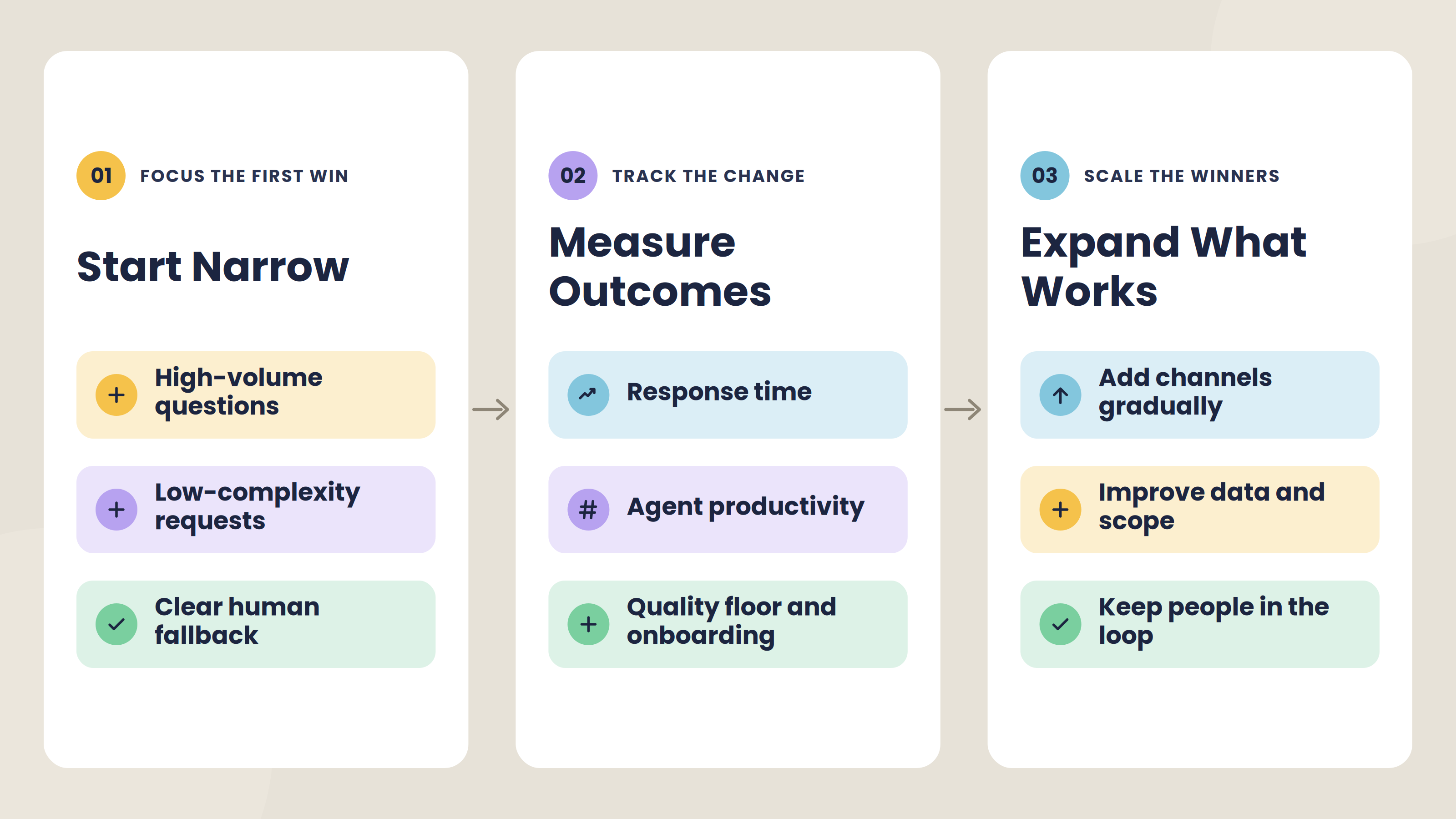
The gains from these examples are real, but they land unevenly, and a project that ignores where they show up tends to stall.
Where AI pays off most is high-volume, low-complexity work. Routine questions get answered in seconds at any hour, response times drop because nothing sits waiting in a queue, and agents spend less time on wrap-up and repetitive typing.
The productivity study cited earlier found the biggest gains going to newer agents, which points to the real prize. The value is faster onboarding and a higher-quality floor, more than a cut to headcount. Most teams put the time saved back into the harder conversations that need a person.
The counterweight is that a large share of AI projects never reach production. The failures rarely trace back to the technology. They come from pointing it at the wrong problem, feeding it poor data, skipping the human fallback, or using a tool that dresses up a basic chatbot as an autonomous agent.
The pattern underneath is consistent: teams that see results start narrow, measure outcomes, and expand what works.
What the Best Examples Have in Common
Across the twelve, the same three ingredients separate the ones that work from the ones that frustrate.
A clean handoff to a human
Every strong example knows its limit and hands off well. The chatbot that reaches a person in one step, the voicebot that passes the call with the details attached, the summary that travels between departments. AI earns trust by making the escape hatch fast and nearly invisible. A bot that traps people in a loop to prove it can handle everything does the opposite.
Good data underneath
Personalization, predictive outreach, sentiment analysis, and agent assist all rest on the same foundation: clean, connected customer data plus a current knowledge base. Pointed at scattered or stale information, AI produces confidently wrong answers at scale.
A clear line between assist and resolve
Teams that succeed decide up front what AI closes on its own and what it only supports, then hold that line. This is the handle-versus-resolve distinction from the start of the article, applied as a design choice. A tool that drafts a reply for an agent and a tool that sends one without review carry different risk, and treating them the same is how projects get into trouble.
AI works best as a layer on top of a support operation that already works, amplifying what is there, good and bad.
How To Bring AI Into Your Customer Service
You do not need to automate everything at once. The teams that get this right start with one job, prove it, then widen.
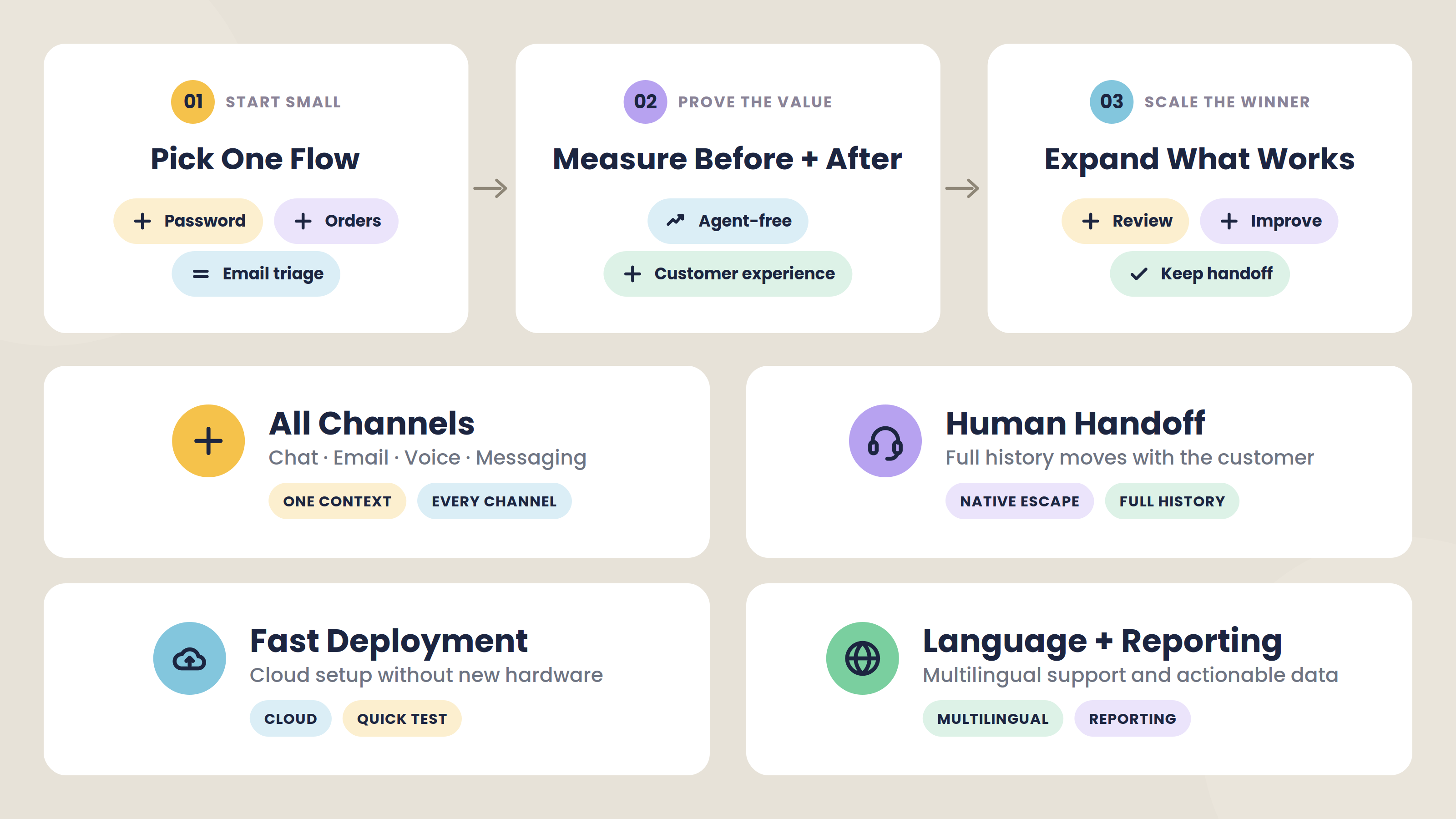
Pick a single high-volume, low-complexity flow first
Password resets, order-status checks, appointment booking, and email triage are all good candidates, since they are frequent, repetitive, and low-risk when the AI hands off on anything it is unsure about.
Measure two things before and after
First, how many of those contacts resolve without an agent. Second, what customers think of the experience. If both hold up, expand to the next flow. If they do not, you have learned something cheap instead of betting the whole operation on it.
When you choose a platform, a few things matter more than the feature list.
One place for every channel
Customers move between chat, email, phone, and messaging apps, and they expect to pick up where they left off. A platform that runs all of them together, with context carried across, beats a stack of disconnected tools that each solve one channel.
Handoff built in rather than bolted on
The escape hatch to a human should be native, with the full history attached. This is the single feature that keeps AI from becoming a wall between the customer and a resolution.
Fast to deploy
Cloud platforms that run without new hardware or a long integration project let you test that first flow in weeks instead of quarters, so you can start small and learn fast.
Language and reporting from day one
Multilingual coverage widens your reach without new hires, and consistent analytics turn every interaction into data you can act on.
How Nexios Covers These Examples
Nexios runs most of what this article describes in one platform, across voice and video, email, SMS, live chat, WhatsApp, Viber, and Facebook Messenger, so a request that starts on one channel carries on another without the customer repeating themselves.
On the front line, a chatbot answers common questions and captures details on chat and messaging apps, while a voicebot picks up calls, understands natural-language requests, and resolves routine ones on its own.
When a request goes past answering, a virtual agent carries it end to end, and an AI email assistant helps work through inbound mail. Anything the AI cannot close is passed to a person with the context attached, through a built-in handoff.
For phone teams, Call Control and Queuing handle the routing side of these examples. An IVR and skill-based routing send each caller to the right agent, while call distribution, queue overflow, and callback reconnect keep the queue moving when volume spikes.
Behind the agent's screen, Task Management organizes tickets across the company, Reporting and Analytics turns every interaction into real-time dashboards and custom KPIs you can act on, and Campaigns and Activity run outbound outreach and activity notifications for proactive contact.
Multilingual support lets a lean team serve customers in their own language, and personalization draws on each customer's history so every one of these tools opens with context instead of a blank screen.
Setup is cloud-based with no installation period, so you can put the first flow live quickly and expand from there. To see it against your own use case, book a demo and start with the one flow that costs your team the most time today.
AI in Customer Service Examples FAQs
1. What is AI in customer service? AI in customer service is the use of artificial intelligence, such as chatbots, voicebots, and virtual agents, to answer questions, complete requests, and support human agents across channels like chat, phone, and email. It ranges from a bot handling a simple FAQ to a system that reads customer sentiment or resolves a request from start to finish.
2. What are the most common examples of AI in customer service? The most common examples of AI in customer service are chatbots, voicebots, virtual agents, AI email assistants, intelligent call routing, sentiment analysis, agent assist, automated ticket tagging, conversation summaries, predictive support, multilingual support, and personalization. Most real deployments combine several of these at once.
3. Does AI replace human customer service agents? No. AI in customer service handles routine, high-volume work and assists agents in real time, but it still routes anything complex or sensitive to a person. The strongest setups pair automation with a fast, clean handoff to a human.
4. What is the difference between a chatbot and an AI virtual agent? A chatbot answers questions and follows scripted or conversational flows, while an AI virtual agent takes action, verifying an account, processing a return, or updating a booking, and completes the task from start to finish. In short, a chatbot mostly informs and a virtual agent resolves.
5. How much can AI reduce customer service costs? AI reduces customer service costs by deflecting routine contacts, shortening handle times, and cutting after-call work, though the size of the saving depends on the use case and how well the tool is deployed. The more reliable gains tend to come from faster agent onboarding and higher first-contact resolution than from cutting headcount.
6. Can small businesses use AI in customer service? Yes. Cloud-based AI customer service tools let small teams offer 24/7 support, answer common questions instantly, and cover more languages without hiring for every role. Because these platforms deploy without heavy infrastructure, a small business can start with one flow and expand as it grows.
Get free insights via email
Practical support insights on service metrics, AI and the playbooks teams actually run, straight to your inbox. Free, unsubscribe anytime.