How to Automate Customer Support Without Hurting Your Brand Voice
Most people know what it's like to ask a support bot for help and get nowhere. A customer asks a simple question, and the bot thanks them for contacting support, then asks for the order number they just gave it.
Automation takes repetitive questions off a support team's plate, but customers notice the moment a reply stops sounding like the brand. A cheerful template sent to someone whose order went missing, or a bot that won't let go of a conversation it can't solve, can undo months of goodwill with that customer in a single reply.
Customers are open to automation as long as a person stays within reach. In a 2026 survey of 3,566 business and consumer customers, 50% said their interactions are easier when companies use generative AI (GenAI), while 87% said it's essential for companies to provide an option to reach a human agent when using it.
Here's how to automate support without hurting your brand voice in seven steps, from turning the voice into rules a bot can follow to handing off to a human with full context. You'll also find the metrics that show whether your voice holds up and a 30-day plan to roll it out.
What Brand Voice Means in Customer Support
Brand voice in customer support is the personality customers hear in every reply, whether a person or a bot wrote it. It comes down to four choices you make once and keep:
- Vocabulary, the words to use and the ones to avoid
- Formality, from first names and contractions to full sentences and titles
- Personality, whether that's warm, direct, or playful
- Structure, or how replies greet, apologize, and sign off
Tone is the part that flexes. The voice stays the same in every conversation, while the tone follows the customer's situation. It gets calmer and more careful when an order goes missing, and lighter when someone just wants the opening hours.
A bot trained on one tone sends the same upbeat reply to a customer asking about sizes and to one who's just been charged twice. Before automating anything, write tone rules for each situation next to the voice rules.
4 Reasons Automated Support Starts Sounding Off-Brand
When automated replies start to sound like someone else's company, the cause is usually one of four gaps in how the automation was set up or looked after.
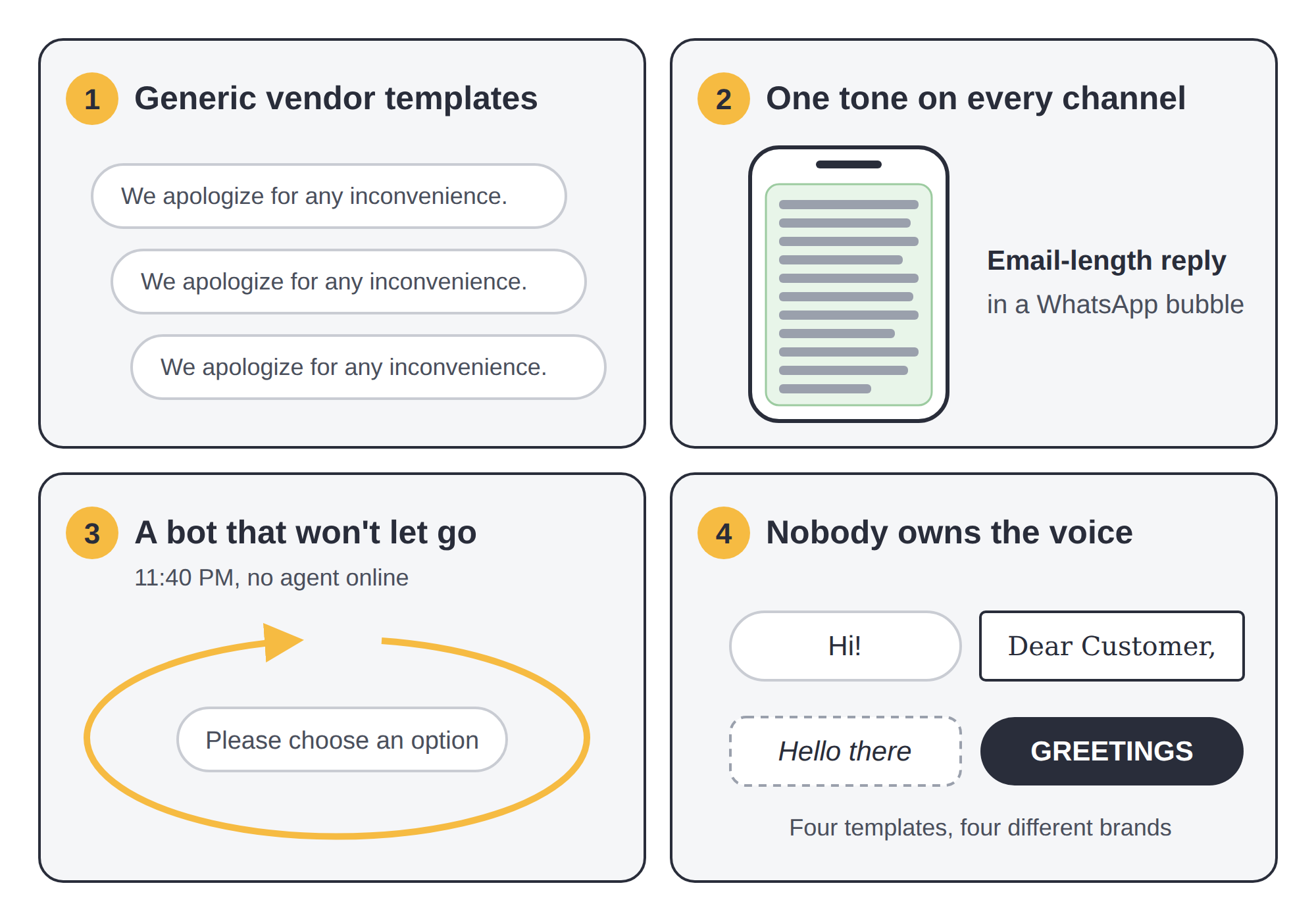
- Generic templates from the tool vendor. Default replies are written to fit every company. If nobody rewrites them, "We apologize for any inconvenience" ends up in reply after reply, and the brand starts sounding like the support software it runs on.
- One tone across every channel. A reply written for email lands as a wall of text on WhatsApp, and a two-line chat answer looks careless in a formal email thread.
- A bot that holds on to the conversation too long. Once it's clear the bot can't help, every extra loop through the same options adds to the customer's frustration, so they reach an agent already annoyed. After hours, with no agent to hand over to, the loop can run until the customer gives up.
- Nobody owns the voice after launch. Product names change, a return policy gets updated, and whoever needs a new template writes one in their own style. A few months later, the bot greets customers four different ways.
7 Steps to Automate Support Without Hurting Your Brand Voice
Automate support without hurting your brand voice by setting the rules first and the automation second. Many teams do it the other way around, and that's usually where the four gaps above start. The steps below follow the rules-first order, from writing the voice down to reviewing it once it's live.
1. Turn Your Brand Voice Into Rules a Bot Can Follow
A style guide written for marketers rarely works as bot instructions, since "friendly but professional" gives a bot nothing concrete to apply. Rewrite it as rules an automated reply can follow word for word.
Cover these five areas:
- Words to use and avoid, for example "order" instead of "purchase," or never opening with "unfortunately"
- Greeting and sign-off, including whether replies use the customer's first name
- Contractions and sentence length, with "we'll" instead of "we will" and no more than two sentences per chat message
- Emoji policy, stating which channels allow them and which never do
- Formality per language and market, since Spanish-speaking customers may expect the formal "usted" even when the English replies stay casual
Here's how five of these rules change a real reply. The examples are illustrative.
| Voice rule | Off-brand reply | On-brand reply |
| Use the customer's first name and contractions | "Dear Customer, we would like to inform you that your order has been shipped." | "Hi Ana, your order's on its way and should arrive by Thursday." |
| Lead with the answer | "Thank you for contacting us. We have received your inquiry regarding your refund." | "Your refund went out today and should reach your account in a few business days." |
| Skip the apology template | "We apologize for any inconvenience this may have caused." | "Sorry your parcel is late. You can see exactly where it is with this tracking link." |
| Name the person taking over | "Your request has been escalated to the relevant department." | "I'm passing this to Marko from our billing team, who'll pick it up from here." |
| No emoji in email | "Your ticket is closed 😊👍" | "Your ticket is closed. Reply to this email if anything else comes up." |
Keep the rules in one place that the bot, the AI drafting tool, and new agents all read from, so a single update changes every reply at once. Copies pasted separately into three tools tend to drift apart within weeks.
2. Sort Conversations by Risk Before You Automate Them
Decide how much automation each conversation gets based on what's at stake if the reply goes wrong. A wrong answer about opening hours costs one follow-up question, while a tone-deaf reply to a cancellation request can lose the customer for good.
Support tools group conversations by intent, meaning what the customer wants to get done. Here's how three risk levels map to common intents and the automation that fits each one.
| Risk level | Example intents | Automation mode | Who sends the reply |
| Low | Order status, opening hours, password reset, invoice copy | Fully automated | Bot |
| Medium | Returns and exchanges, product questions, refund status, appointment changes | AI drafts the reply, an agent reviews and edits it | Agent |
| High | Complaints, cancellations, billing disputes, data requests under the General Data Protection Regulation (GDPR) | Automated routing and a handoff message only | Agent |
Move a conversation up a level the moment the customer's tone turns negative, even if the intent started as low risk. A "where's my order" message becomes a complaint once the delivery date has slipped twice, and the reply should come from a person.
3. Start With Your Five Most Repetitive Questions
Start with the questions your team answers most often, as long as they sit in the low-risk row of the matrix above. They take up the most agent time, and a slip on one of them costs little. Work through these five steps:
- Export the last 30 to 90 days of conversations from every channel, chat and messaging apps included, since that's where many of the quick, repeat questions come in.
- Group them by intent rather than by ticket tag, since different agents tag the same question in different ways. A catch-all "General inquiry" tag often hides three or four separate questions.
- Pick the five intents with the highest volume that sit in the low-risk row.
- Write each answer once in the brand voice, using the words customers use in their own messages.
- Test each answer with a few agents before it goes live, then automate it on one channel first.
Add new intents one at a time once the first five hold up in your weekly review, so every automated answer goes through the same voice check.
4. Adapt the Tone to Each Channel
Keep the voice the same on every channel and adjust the length, format, and formality to fit where the customer wrote in.
On WhatsApp, a reply lands between a family group chat and a delivery update, so it has a few seconds to make sense. Email gets more patience, since people open it expecting a complete answer they can come back to later. Here's how one voice adapts across the channels most support teams run.
| Channel | Length | Formality | Format |
| WhatsApp, Viber, Messenger | One to three short messages | Warm and casual | Plain text, emoji if your policy allows, a link instead of long instructions |
| Live chat | Short turns, one question at a time | Conversational | Quick-reply buttons for common options |
| SMS | One short message | Neutral | Plain text with a single link or code |
| A complete answer in one reply | Structured and polite | Short paragraphs, bullets for steps, a clear subject line | |
| Voice and interactive voice response (IVR) | Short spoken sentences | Plain and calm | No jargon, key details confirmed back to the caller |
Write a channel version of each automated answer from Step 3 instead of pasting the email text into chat.
Running messaging apps and email from one interface keeps each channel's tone rules together. When a customer switches from WhatsApp to email mid-issue, they get the email version of the same voice, and the agent sees the whole thread.
5. Use AI to Draft Replies Agents Approve
For medium-risk conversations, let AI write the first draft and have an agent review, edit, and send it. The customer gets a faster reply, and a person still checks the tone before it goes out.
Set it up in three steps:
- Feed the AI the voice rules from Step 1 and the approved answers from Step 3, so its drafts start from your wording.
- Show the draft to the agent inside the conversation, next to the customer's message, so reviewing it takes seconds.
- Track how often agents edit each draft and what they change.
The edit rate is your early warning for voice drift. When agents keep rewriting drafts for one intent, the rules for that intent need work. Drafts that go out unchanged for weeks may be ready for full automation, as long as a wrong reply on that topic would be easy to put right.
The workflow pays off most in email, where replies run longer and one off-tone sentence stands out, so an AI email assistant is the natural place to start.
6. Hand Off to a Human With Full Context
Hand the conversation to an agent as soon as the bot stops helping, and pass along everything the customer has already said. A handoff that loses the context wastes the time the bot was meant to save.
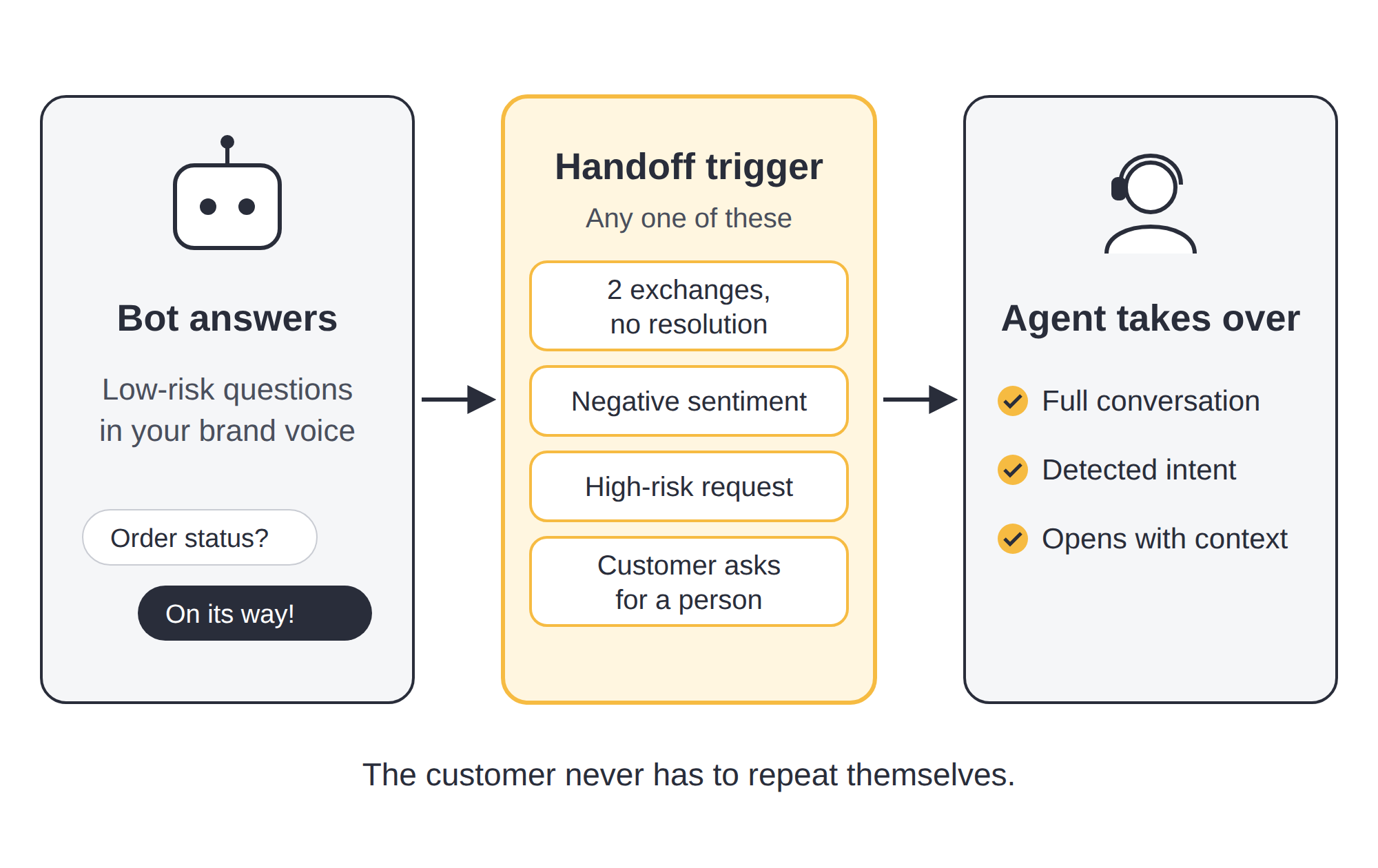
Set the bot to hand off when any of these four things happens:
- Two exchanges go by without a resolution, usually with the customer rephrasing the same question
- The customer's tone turns negative, with repeated questions or messages in all caps
- The intent is high risk (Step 2), for example a complaint or a cancellation
- The customer asks for a person in any wording ("agent," "human," "someone real")
Then make the handoff itself sound like your brand:
- Tell the customer a person is taking over and when to expect a reply.
- Pass the full conversation and the detected intent to the agent, so the customer never has to repeat themselves.
- Have the agent open with that context, for example "I can see your parcel was due on Tuesday. Let me check with the courier now."
Outside working hours, tell the customer when a person will reply instead of keeping them in a bot loop until the morning.
7. Review Automated Conversations Every Week
Review a sample of automated conversations every week so small voice slips get fixed before they spread across hundreds of replies. Run the review in this order:
- Pull 20 to 30 automated conversations across different channels and intents, including a few that ended in a handoff.
- Score each one against the voice rules from Step 1, checking the greeting, the wording, and whether the tone fit the situation.
- Read the handoffs closely to see whether the trigger fired early enough and the agent opened with context.
- Fix the answer, rule, or trigger behind each slip, and keep a short note of what changed so next week's review starts from there.
Name one person who owns the brand voice in support, usually a team lead or a quality assurance specialist. They run the weekly review, approve new automated answers, and update the rules whenever a product or policy changes. Splitting the role across a few people sounds fair, but in practice it's how the bot ends up greeting customers four different ways.
What You Should Never Automate in Customer Support
Keep seven types of conversations with a person from the first real answer, since each one puts the relationship, money, or legal compliance at stake. Some teams automate them anyway to hit response-time targets, and it's the quickest way to turn an unhappy customer into a lost one.
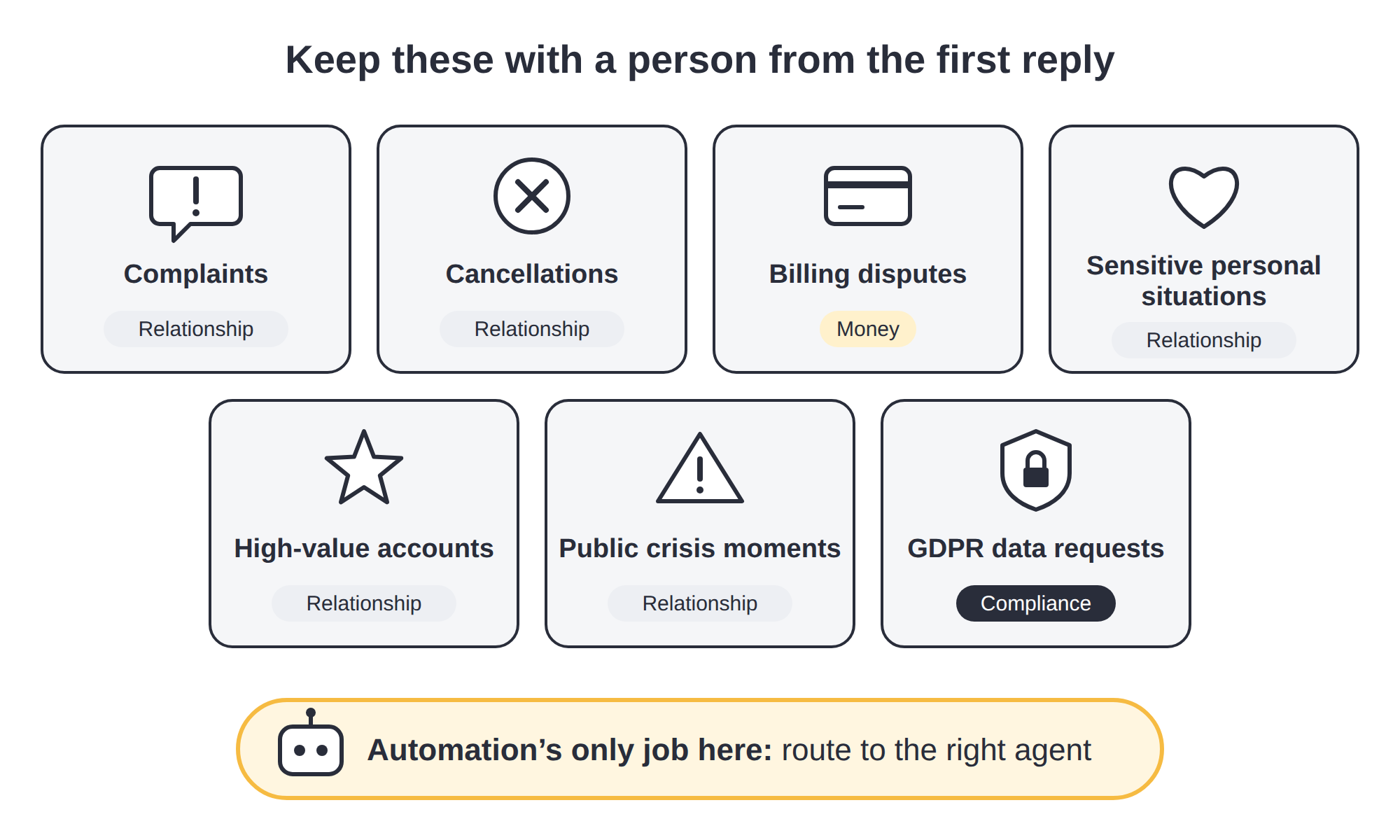
- Complaints, because the customer needs to hear from someone who can fix the problem, and a template in that moment reads as a brush-off.
- Cancellations, because it's your last chance to learn why the customer is leaving and, where it fits, to offer a reason to stay.
- Billing disputes, because they involve the customer's money and usually need an agent to check the account and approve a correction.
- Sensitive personal situations, such as a bereavement to a medical emergency, or financial hardship, because a scripted reply to someone in a difficult moment sounds careless however well it's written.
- High-value accounts, such as enterprise clients or long-standing customers, because they expect a named contact, and a bot reply tells them they're treated like everyone else.
- Public crisis moments, such as an outage, a data incident, or a product recall, because an automated answer written before the crisis can contradict what's happening now.
- GDPR data requests, because the regulation sets a legal deadline for the answer.
Under the GDPR, a company must answer a request to access or delete personal data within one month. For complex requests, it can extend that by two more months, as long as it tells the customer within the first month. Route every data request to a trained person the moment it arrives, so the clock doesn't run out inside a bot conversation.
With these conversations, automation's only job is routing each one to the agent or team that can resolve it.
5 Metrics That Show Whether Automation Protects Your Brand Voice
Track these five metrics for automated conversations separately from the ones agents handle, since a blended average hides where the voice slips.
Here's what each metric shows and the warning sign to watch for.
| Metric | What it shows | Warning sign |
| Customer satisfaction score (CSAT) gap | The difference in CSAT between automated and human-handled conversations | The gap widens after a new automated answer goes live |
| Escalation rate | The share of bot conversations handed to an agent | A sudden rise on one intent, which points to an answer that no longer fits |
| Draft edit rate | How often agents change AI-drafted replies before sending them | Agents keep rewriting drafts for the same intent |
| Repeat contact rate | The share of customers who come back about the same issue within seven days | Customers return after an automated answer marked the issue as resolved |
| Sentiment shift | Whether the customer's tone improves or worsens during the conversation | Conversations that start neutral and end negative after a bot reply |
Review these numbers in the same weekly session as Step 7, starting with the intents where two or more metrics move in the wrong direction. One metric dipping for a week is often noise, while two moving together usually point to an answer that needs rewriting.
Before-and-After Examples of On-Brand Automated Replies
These three conversations show the steps above working together across a full exchange, each one comparing a generic setup with an on-brand one. The examples are illustrative.
Order Status on WhatsApp
Before:
-Customer: Hi, where's my order? #48213 -Bot: Dear Customer, thank you for contacting us. Your request is important to us. Please provide your order number so we can assist you. -Customer: I just did -Bot: I'm sorry, I didn't understand. Please choose an option. 1. Order status 2. Returns 3. Other
After:
-Customer: Hi, where's my order? #48213 -Bot: Hi Ana! Your order left our warehouse yesterday and should arrive on Thursday. Here's the tracking link. -Customer: Can I change the delivery address? -Bot: Address changes need a quick check from our team, so I'm passing you to Luka. He'll reply right here.
Why it works: the bot picks up the order number the customer already gave and answers in two short messages. Once the request moves beyond low risk, it hands off to a named agent.
Password Reset by Email
Before:
Subject: Ticket #99812 Automated response “Dear user, we have received your request. A password reset link has been sent if the account exists. Do not reply to this email. Regards, Support Team”
After:
Subject: Your password reset link “Hi Marta,
Here's the link to reset your password. It stays active for the next 30 minutes. If it expires before you open it, request a new one from the login page.
Didn't ask for a reset? Reply to this email and we'll secure your account.
Thanks,
The [Your Brand] Support Team”
Why it works: the subject line tells Marta what's inside before she opens it. The email asks for one action, covers what to do if the link expires, and keeps the reply path open, where the generic version says "Do not reply."
Complaint Handoff in Live Chat
Before:
-Customer: This is the third time my delivery has been late. I want a refund. -Bot: I understand your frustration! 😊 Here are some articles that might help. "How to track your order" -Customer: I DON'T WANT ARTICLES -Bot: Sorry, I didn't get that. Could you rephrase?
After:
-Customer: This is the third time my delivery has been late. I want a refund. -Bot: I'm sorry about the repeated delays. I'm connecting you with Petra from our team, who can handle the refund and will see everything you've written here. -Petra (agent): Hi, I'm Petra. I can see your last three deliveries arrived late, and I've started the refund for this order. It'll show in your account within a few business days.
Why it works: a complaint with a refund request is high risk, so the bot's only job is the handoff. Petra opens with what she already knows, and the customer doesn't have to explain anything again.
A 30-Day Plan to Automate Support Without Losing Your Voice
You don't have to automate everything at once. A four-week rollout gives each part time to be tested before the next one goes live.
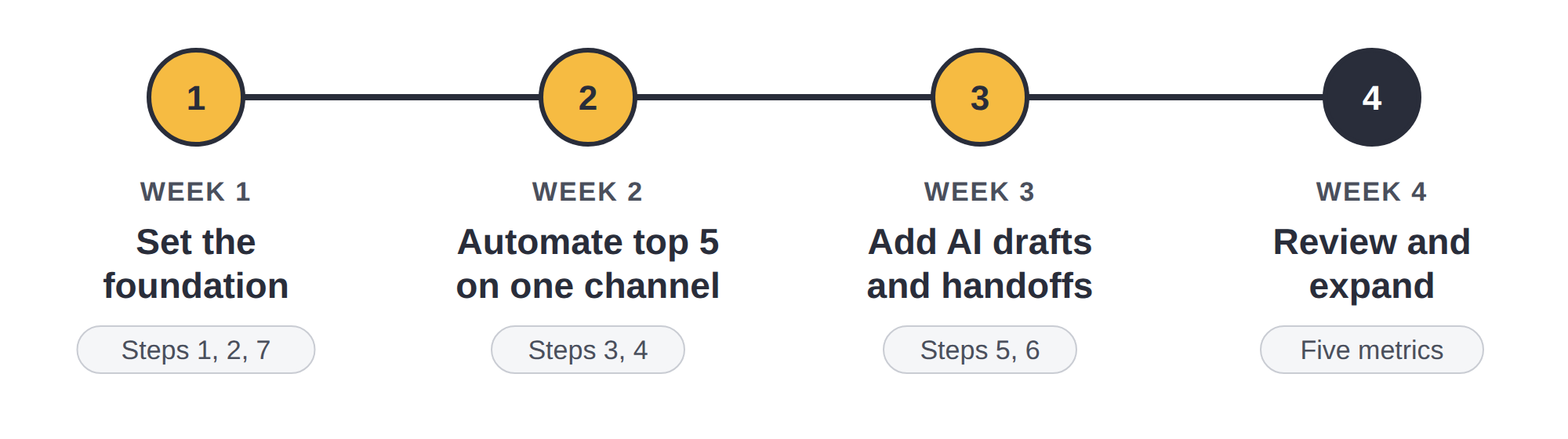
- Week 1: Set the foundation. Write your voice rules (Step 1), sort your intents by risk (Step 2), and name the person who owns the voice (Step 7).
- Week 2: Automate your top five questions on one channel. Start with the channel that carries the most repetitive volume, write the answers (Step 3), and adapt them to that channel's tone (Step 4).
- Week 3: Add AI drafts and handoffs. Turn on AI-drafted replies for medium-risk intents (Step 5) and set the four handoff triggers (Step 6).
- Week 4: Review and expand. Run your first full weekly review with the five metrics above, fix what slipped, then roll the same answers out to the next channel.
By the end of the month, you'll have one channel running on-brand automation and a review routine that tells you when the next one is ready.
How Nexios Automates Support Without Losing Your Brand Voice
Nexios runs every channel, the AI behind it, and the data you review from one place, so the steps in this guide don't depend on juggling separate tools.
- One interface covers eight channels (voice, video, email, SMS, live chat, WhatsApp, Viber, and Messenger), so agents apply the same voice rules on every channel from one place.
- Smart routing, the AI email assistant, and automated ticketing run on AI that Nexios develops in-house. Because it doesn't rely on third-party AI application programming interfaces (APIs), conversation data stays away from outside AI providers.
- User roles, permissions, and data-retention periods can be set to match your internal policies.
- Customer data is hosted in a private cloud in Croatia, with ISO-certified security and full GDPR compliance, so you always know where your conversations are stored.
Decathlon, one of Nexios's clients, credits the platform's dashboard and process automation, including call queuing, with helping it keep a monthly response rate above 90%.
Ready to keep every automated reply on-brand across all your channels?
How to Automate Support Without Hurting Your Brand Voice FAQs
1. Can you automate customer support without sounding robotic?
Yes, you can automate customer support without sounding robotic if you:
- Write your brand voice as rules the bot follows
- Adapt the tone to each channel
- Hand off to a person as soon as the bot stops helping
- Review a sample of automated conversations every week
2. What customer support tasks should you automate first?
The customer support tasks to automate first are the five low-risk questions your team answers most often, such as order status, opening hours, password resets, and invoice copies.
They're a safe way to test your voice rules before automating anything more sensitive.
3. What should never be automated in customer service?
Seven types of customer service conversations should never be automated:
- Complaints
- Cancellations
- Billing disputes
- Sensitive personal situations
- High-value accounts
- Public crisis moments
- GDPR data requests
With these conversations, automation's only job is routing them to the person or team that can resolve them.
4. How do you keep AI replies consistent with your brand voice?
You keep AI replies consistent with your brand voice by feeding the AI your voice rules and approved answers, then having an agent review each AI-drafted reply for medium-risk conversations before it goes out.
Tracking how often agents edit each draft shows where the voice starts to drift.
5. When should a chatbot hand off to a human agent?
A chatbot should hand off to a human agent when any of these four things happens:
- Two exchanges pass without a resolution
- The customer's tone turns negative
- The intent is high risk, for example a complaint
- The customer asks for a person
The agent should receive the full conversation, so the customer never has to repeat themselves.
6. How do you measure whether automation hurts customer experience?
You measure whether automation hurts customer experience by tracking five metrics for automated conversations separately from human-handled ones:
- CSAT gap
- Escalation rate
- Draft edit rate
- Repeat contact rate
- Sentiment shift
7. How should automated support handle GDPR data requests?
Automated support should route every GDPR data request to a trained person the moment it arrives, whether it's a request to access or delete personal data.
Under the GDPR, a company must answer within one month. For complex requests, it can extend that by two more months, as long as it tells the customer within the first month.
Get free insights via email
Practical support insights on service metrics, AI and the playbooks teams actually run, straight to your inbox. Free, unsubscribe anytime.