Call Center Service Level: How to Calculate, Set, and Improve It
Call center service level is the percentage of incoming calls answered within a set time, for example 80% of calls answered within 20 seconds. It's one of the first numbers supervisors check on the wallboard, and a bad morning on that number can set the tone for the whole shift.
The most quoted target is 80/20, but it's a reference point rather than a rule every team should copy. The right target depends on what your customers call about, how urgent those calls are, and what it costs to keep enough agents on the phones.
Below you'll find how to calculate service level, including what to do with abandoned calls. You'll also see how to choose a target, how service level ties to staffing, and seven ways to improve it without hurting call quality.
What Is Call Center Service Level?
Service level measures the share of calls your team answers within a time limit you've chosen, called the threshold. It's written as two numbers, X/Y, where X is the percentage of calls and Y is the threshold, usually in seconds, so 80/20 reads as "80% of calls answered within 20 seconds."
The term is used in two ways, and it helps to keep them apart. The service level target is the goal your team sets, while the measured service level is what actually happened on a given day or in a given half hour. A team can have an 80/20 target and a measured service level of 72% for the morning shift.
The clock usually starts when the call enters the queue, meaning after the caller has gone through the interactive voice response (IVR) menu or the welcome message. Time spent in the IVR isn't counted, because the caller isn't waiting for an agent yet.
Why Call Center Service Level Matters, and What It Doesn't Tell You
Service level is the clearest picture of how long callers wait before they reach a person. A caller on hold can't do anything else, and every extra minute makes them more likely to hang up, call back later, or arrive at the agent already annoyed.
For managers, service level works as an early warning for staffing. When it drops in a specific half hour, the cause is usually too few agents for the calls coming in, which is something you can fix with scheduling.
The metric has clear limits, though. A high service level says nothing about whether the caller's problem got solved or whether they hung up happy, so a team can hit 90/20 with rushed calls and still lose customers.
Read it next to the quality metrics covered below, and as one part of your wider plans to improve customer satisfaction.
How to Calculate Call Center Service Level
The basic formula is simple, but a few decisions about which calls to count change the result more than you might expect.
The Service Level Formula
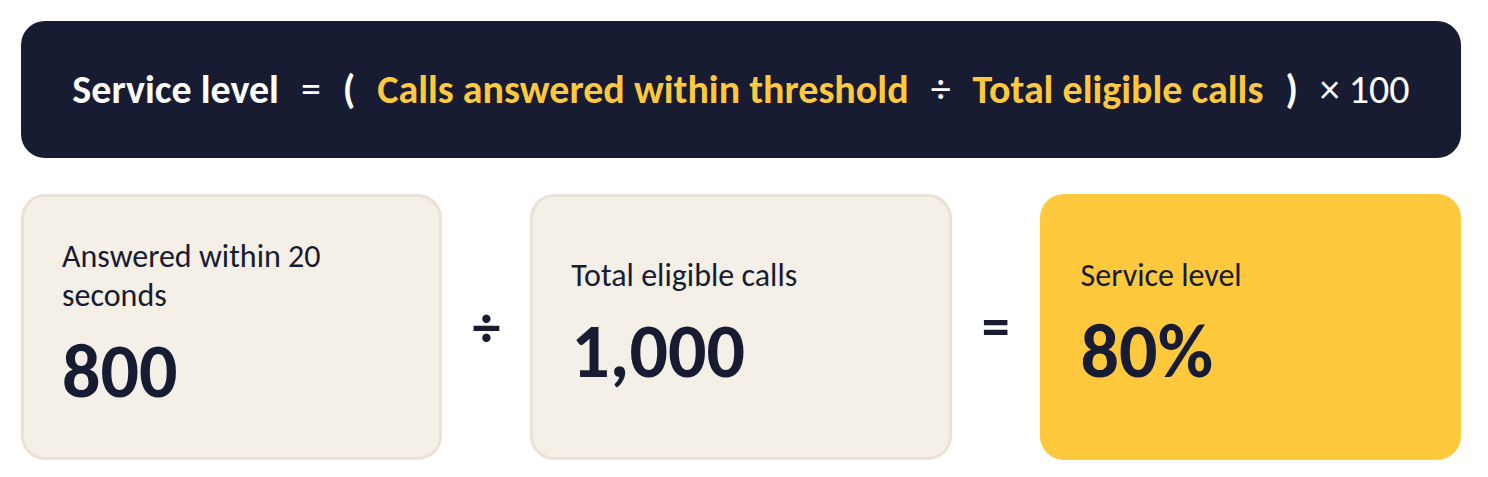
Divide the calls answered within your threshold by all eligible calls in the same period, then multiply by 100:
Service level = (Calls answered within threshold ÷ Total eligible calls) × 100
Say a support line receives 1,000 calls between 9 a.m. and 5 p.m., and agents answer 800 of them within 20 seconds. The service level for that day is 800 ÷ 1,000 × 100 = 80%, which meets an 80/20 target exactly.
Many contact center platforms calculate service level automatically for each queue. If yours doesn't, export the time each call entered the queue and the time an agent answered, then count how many waited less than your threshold.
What Counts as an Eligible Call
The tricky part of the formula is the bottom number, total eligible calls. Callers who hang up before an agent answers, known as abandoned calls, can be counted in different ways, and each choice gives a different result.
Take one day with 1,000 calls coming in. Agents answered 760 of them within 20 seconds and 160 after that, while 80 callers hung up first, 30 of them within the first five seconds.
Here's how the three common methods treat the same day:
| Method | Calculation | Service level |
| Count every call, including all abandoned calls | 760 ÷ 1,000 | 76.0% |
| Exclude short abandons (callers who hung up within 5 seconds) | 760 ÷ 970 | 78.4% |
| Exclude all abandoned calls | 760 ÷ 920 | 82.6% |
The same day can look like a miss or a pass depending on the method. Counting every call is the strictest version and the closest to what callers actually experienced. Excluding short abandons is a common middle ground, since a caller who hangs up after two seconds often dialed by mistake.
Excluding all abandoned calls makes the number look best and hides the callers who gave up waiting, so if you use it, report abandonment rate right next to it. Whichever method you pick, write it into your service level agreement (SLA) and use it the same way in every report.
Measure by Interval and Queue, Not Just by Day
A daily service level can hide the hours when callers waited the longest. Picture a day where the whole team reaches 82%, while the 9:00 to 10:00 a.m. rush, with 400 calls and only 220 answered on time, sits at 55%.
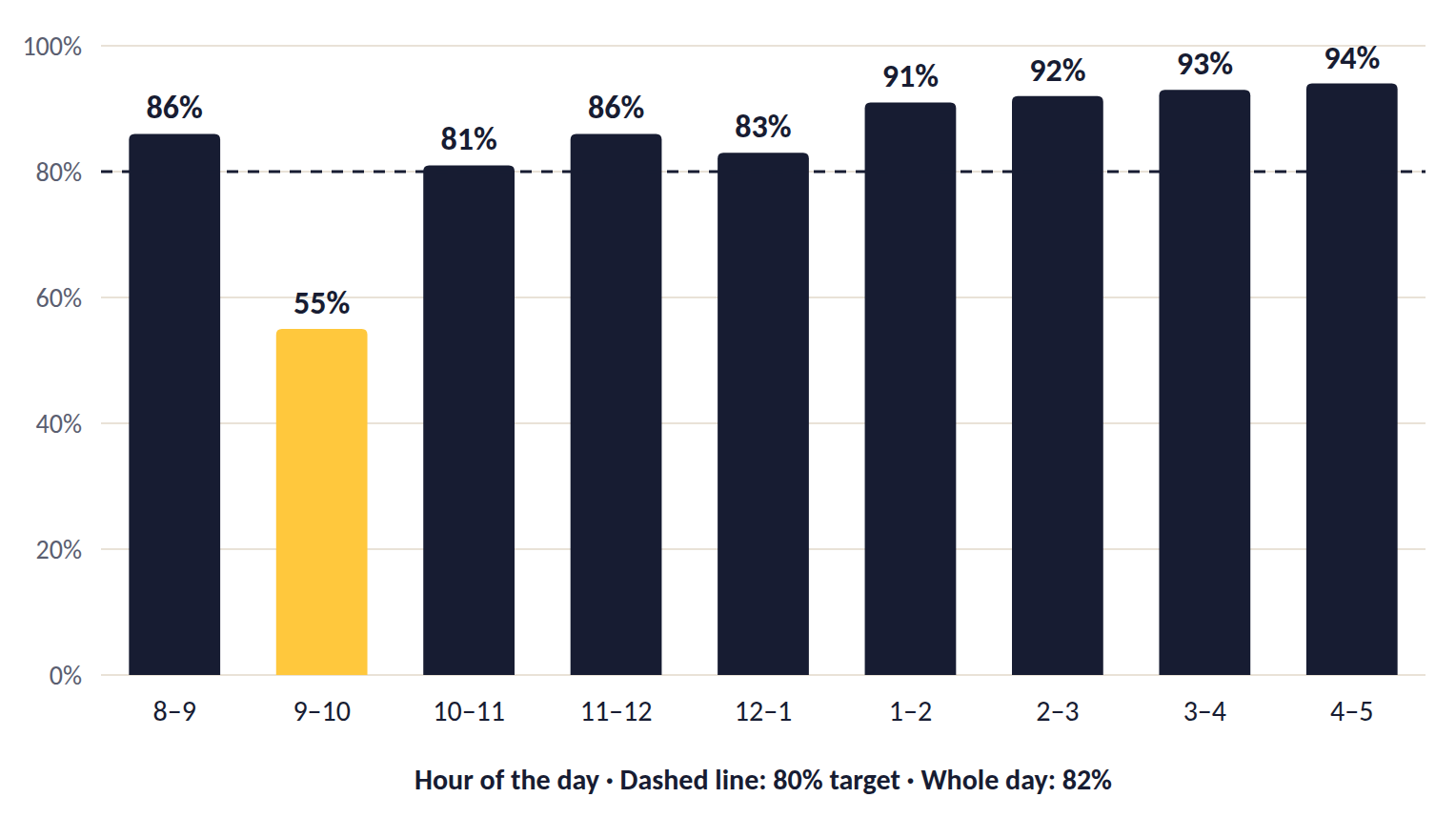
Track service level in 15- or 30-minute intervals so you can see exactly when the queue falls behind. Split the numbers by queue as well, because a billing line and a technical support line rarely have the same peaks, and one combined figure blurs both.
What Does 80/20 Mean in a Call Center?
80/20 means that 80% of calls are answered within 20 seconds. It's the most widely quoted service level target in the industry and a common starting point for teams setting their first goal. It has nothing to do with the Pareto principle, the "80/20 rule" about 80% of results coming from 20% of causes, even though the two share a name.
In practice, a queue that receives 500 calls in an hour meets 80/20 if agents answer at least 400 of them within 20 seconds. The appeal is easy to see, since 20 seconds is a short wait for most calls, and 80% leaves room for the unpredictable spikes every contact center gets.
The target says nothing about the other 20%. Those 100 callers might wait 30 seconds or 10 minutes, and the queue still meets 80/20 either way. Track the longest wait in the queue and abandonment rate next to it to see what happens to those callers.
The same format works for any pair of numbers, so a 90/30 target means 90% of calls answered within 30 seconds. Comparing two targets takes a closer look, because 90/30 asks for more calls to be answered on time but gives agents a longer threshold to do it.
Use 80/20 as a reference point when you compare targets, then set your own number based on your callers and your budget.
What Is a Good Call Center Service Level?
A good call center service level is one that matches what your callers need at a staffing cost the business can sustain, which is why two contact centers with very different targets can both be getting it right.
Weigh these factors when you choose a target:
- How urgent the calls are, since a caller reporting a lost card or a gas leak needs a much faster answer than someone asking about an invoice.
- How complex the calls are, as long, technical calls keep agents busy and make tight thresholds harder to hold.
- What your callers expect from you, based on your industry, what your marketing promises, and what competitors offer.
- How calls spread across the day, because a sharp morning peak is harder to cover than steady volume.
- Your opening hours and whether you offer callbacks or other channels when the queue gets long.
- The cost of the target itself, which rises sharply with every step up, as the staffing example below shows.
Many teams end up with different targets for different queues. A bank, for example, might aim for 90/20 on its card-fraud line, where every minute matters, and 80/60 on its general questions line, where callers are happy to wait a little longer.
Your own data is the best guide, so check when callers start hanging up. If abandonment climbs sharply once the wait passes 40 seconds, a threshold well below that keeps most callers on the line. Then use the staffing example below to see what each step up would cost.
Service Level on Other Channels
The X/Y format works on every channel, but what counts as "answered" and the unit you measure in change from one to the next. Set a separate target for each channel, since one combined figure would mix waits measured in seconds with waits measured in hours.
| Channel | What counts as answered | Threshold usually measured in | What to watch |
| Phone | An agent picks up | Seconds | Abandoned calls |
| Live chat | The agent's first message in the chat | Seconds | Agents handling several chats at once |
| The first reply from a person | Hours | Business hours vs. calendar hours | |
| Messaging apps | The first reply from a person | Minutes | Auto-replies, which don't count |
| Social media | The first public or private reply | Minutes to hours | Public posts other customers can see |
| Callbacks | The agent calls the customer back | Against the time you promised | Missed callback windows |
Live chat is the closest to phone, because the customer is watching the chat window. Agents often handle two or three chats at once, so plan staffing on chat volume and concurrency rather than headcount alone.
Email gives the team more room. In a 2020 survey of more than 3,200 consumers, a one-hour reply met the expectations of 88% of respondents, which makes one hour during business hours a sensible goal to work toward.
Our guide to first response time covers how to set and track response targets on each of these channels.
Metrics to Track Alongside Service Level
Service level tells you how fast calls are answered, and the metrics below fill in the rest of the picture. Keep in mind that your SLA is the promise, while these are the numbers you check against it.
Here's what each one measures and how it relates to service level.
| Metric | What it measures | How it relates to service level |
| Average speed of answer (ASA) | The average time callers wait in the queue before an agent picks up | ASA shows the average wait, while service level shows how many calls stayed under the threshold |
| Abandonment rate | The share of callers who hang up before reaching an agent | A rising abandonment rate often follows a falling service level, and callers who hang up tend to call back, which adds to the queue |
| Average handle time (AHT) | The average length of a call, including talk, hold, and after-call work | Longer calls keep agents busy and push service level down |
| First call resolution (FCR) | The share of calls where the problem is solved without a follow-up | Shows whether fast answers are also good answers |
| Customer satisfaction (CSAT) | How callers rate the experience, usually in a short survey | Confirms whether hitting the target is paying off for customers |
| Occupancy | The share of logged-in time agents spend handling calls | Very high occupancy leaves no free agents for new calls, while very low occupancy means you're paying for more capacity than you need |
| Longest wait in queue | The longest time any caller waited before reaching an agent | Shows the worst experience that a good service level can hide |
Read these numbers together, because the combination tells you where to look:
- When service level drops and call volume is up, the forecast or schedule missed the demand.
- A drop in service level with AHT rising usually points to longer calls, often from a new product, a system issue, or missing information.
- If service level holds but FCR falls, agents are answering fast and sending callers away with problems still open.
- Rising abandonment with a stable service level can mean the threshold is too loose, so callers give up before you count them as late.
These metrics also show whether your wider customer service strategy is working.
How Service Level Connects to Staffing
Service level depends mostly on how many agents are free to take calls at a given moment, and the link between the two isn't a straight line.
Workforce planners use a formula called Erlang C to estimate how many agents a queue needs to hit a target, based on call volume, average handle time, and the threshold.
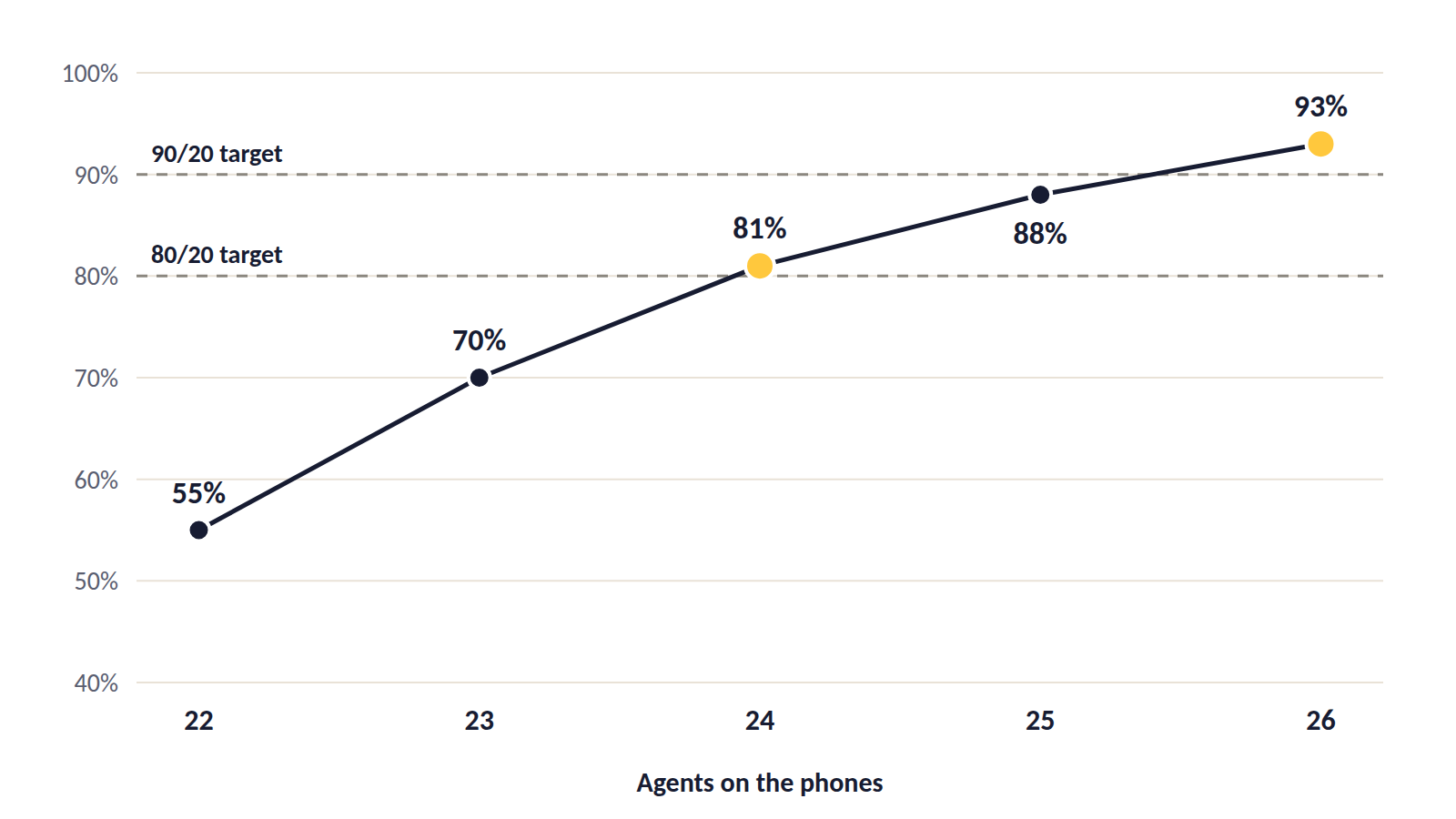
Take a queue that receives 200 calls in a 30-minute interval, with an AHT of three minutes.
Here's what the Erlang C model estimates for different numbers of agents on the phones:
| Agents on the phones | Estimated service level (20 seconds) | Estimated ASA |
| 22 | 55% | 51 seconds |
| 23 | 70% | 25 seconds |
| 24 | 81% | 13 seconds |
| 25 | 88% | 8 seconds |
| 26 | 93% | 4 seconds |
With 24 agents, the queue meets 80/20. Losing just two agents to a break or a long call drops service level to around 55%, which is why a couple of unplanned absences can wreck a morning.
Moving from 80/20 to 90/20 takes two more agents in every interval, roughly 8% more staff for the same calls. Spread across a full day and a whole team, that difference has a real cost, so decide whether your callers truly need the higher target before you commit to it.
Erlang C is a simplified model that assumes nobody hangs up while waiting, so it tends to estimate slightly more agents than you actually need, and planners usually adjust it with their own abandonment data.
The table also counts only agents actively on the phones. To find how many people to schedule, add shrinkage, meaning the share of paid time agents spend away from calls for breaks, meetings, training, and absences.
What Affects Call Center Service Level
Service level drops when demand outgrows the capacity you have in a given interval, so the causes fall into two groups.
On the demand side, more calls arrive than the plan expected:
- Call volume spikes after a billing run, a product launch, or a service outage.
- Repeat calls from customers whose problem wasn't solved the first time, which is why a low FCR often shows up later as a weak service level.
- Callers who hang up and try again, so one frustrated customer can count as two or three calls.
- Self-service that doesn't work, for example an IVR menu that sends simple questions straight to an agent.
- Sudden events that no forecast could predict, from a storm to a news story about your company.
On the capacity side, fewer agents are free than the plan assumed:
- Inaccurate forecasting, where the schedule is built on last year's pattern and misses this year's changes, including seasonal swings.
- Schedules that don't follow demand, for example lunch breaks bunched together right when calls peak.
- Shrinkage that's higher than planned, from sick days to meetings that run late.
- Low schedule adherence, meaning agents aren't on the phones at the times the schedule says they should be.
- A rising average handle time, often caused by slow systems, missing customer information, or complex new products.
- Routing and queue design that sends calls to agents who can't help, so they get transferred and handled twice.
- Gaps in training and access to knowledge, since an agent who has to search for answers keeps every other caller waiting longer.
Service level problems often trace back to two or three of these at once. When the number drops, start with volume and schedules, because those are the quickest to confirm, then use the metric patterns above to narrow down the rest.
7 Ways to Improve Call Center Service Level
Improving service level comes down to matching agents to demand and shortening the time each call takes, while keeping quality where it is. The first two steps help you find where the problem sits, and the rest fix it, so start with the ones that fit your biggest gap.
1. Check How You Measure It
Before changing anything, confirm which calls your formula counts and how it treats abandoned calls. Teams sometimes discover that two reports use different methods, and the "drop" they're chasing is only a change in how the number was calculated.
Agree on one method, write it into your SLA, and use it everywhere from the wallboard to the monthly report.
2. Break Results Down by Interval, Queue, and Call Type
As the interval example earlier showed, a daily figure can hide a weak hour. Look at service level in 30-minute intervals for each queue, then check which call types fill the queue during the weakest periods.
Once you know that, for example, the 9 a.m. billing queue misses its target every Monday, you have a specific problem to solve instead of a vague one.
3. Match Forecasts and Schedules to Real Demand
Build forecasts from recent interval data, adjusted for known events, for example marketing campaigns, holidays, and price changes. Then shape shifts around the forecast so the most agents are working when the most calls arrive.
Move breaks, training, and team meetings into the quietest intervals, and review the forecast against actual volume every week so errors don't pile up.
Keep an eye on schedule adherence as well, since a perfect schedule only helps if agents are actually on the phones when it says they should be.
4. Route Calls to the Right Agent and Plan for Overflow
Every transfer adds wait time for the caller and handle time for the team. Use skill-based routing so calls go straight to agents who can handle them, based on topic, language, or customer type.
Smart call routing and queue management can take this further by reading the caller's history and intent before the call is connected.
For sudden spikes, set queue overflow rules that send calls to a backup group, for example agents from another team or the back office, once the wait passes a set limit.
5. Offer Callbacks and Self-Service
A callback option lets callers keep their place in line without staying on hold, which lowers abandonment and smooths out peaks. Offer it when the expected wait goes over a limit you choose, and make sure agents actually return those calls within the promised time.
Simple requests, for example checking an order status or resetting a password, can often be handled without an agent. A support chatbot or a clear IVR option takes those calls out of the queue, leaving agents more time for the complex ones.
During a known outage, a short IVR message that explains the problem and the expected fix time lets many callers hang up without waiting for an agent.
6. Shorten Handle Time Without Rushing Callers
Look at what slows calls down, from switching between systems to hunting for account details or asking the caller to repeat information. Fixing those steps cuts AHT without pushing agents to end calls early.
Give agents one view of the customer's history, a searchable knowledge base, and coaching on the call types that take the longest. Cut after-call work too, for example with short templates for call notes, so agents are ready for the next call sooner.
7. Track Quality Next to Speed
Faster answers only help if the calls still solve problems. Check FCR, abandonment rate, and CSAT every time you review service level, and treat a rise in repeat calls as a warning sign.
When service level rises and these numbers hold steady or get better, the changes are working. If quality drops, slow down and find out which change caused it.
5 Service Level Mistakes to Avoid
Service level can look healthy in a report while callers still wait too long, and each of these five mistakes can open that gap.
1. Reporting Only the Daily Average
A strong daily figure can hide a morning rush where nearly half the callers waited past the threshold, like the 82% day with a 55% morning described earlier. Report by interval and flag every interval that misses the target, so the weak spots get attention.
2. Hiding Abandoned Calls
Excluding every abandoned call from the formula makes service level look better while the callers who gave up disappear from the report. Track abandonment rate next to service level, and exclude only very short abandons if you exclude any.
3. Chasing the Target at the Expense of Quality
When agents are pushed to clear the queue, they may rush calls, skip steps, or transfer callers too quickly. Those callers come back as repeat calls, which makes the next day's queue even longer. Watch FCR and repeat calls as closely as service level, so speed doesn't come at the cost of solved problems.
4. Using One Target for Every Queue
A single 80/20 target across all lines treats a fraud report and a general question the same way. Set targets per queue based on urgency and caller expectations, and review them when your call mix changes.
5. Adding Agents Before Fixing the Schedule
When service level drops, hiring more people feels like the obvious fix. If the real problem is breaks bunched at peak times or low schedule adherence, new agents end up idle in the quiet hours while the morning rush still misses its target.
Check the schedule and adherence first, then use the staffing math to see how many people you actually need.
How Nexios Helps You Hit Your Service Level Target
Hitting a service level target depends on getting calls to the right agent quickly and seeing problems while there's still time to act. The Nexios platform brings voice, video, email, SMS, live chat, WhatsApp, Viber, and Messenger into one unified interface, so supervisors can see every queue in one place.
- Call control and queuing includes intelligent, rule-based call distribution with skill-based and time-based routing, queue overflow handling, maximum wait time settings, IVR, and callback reconnect for missed connections.
- Reporting and analytics give you a real-time dashboard, custom reports and charts, and the option to add your own KPIs, for example service level by queue and interval.
- Contact tagging and prioritization help urgent calls reach an agent first, while coaching and monitoring tools help team leads work with agents on the call types that take the longest.
- Nexios AI, built on the platform's in-house developed AI, can handle routine questions around the clock and hand the conversation to a human agent when it needs one, which keeps simple requests out of the queue.
See how your queues could look in one real-time view. Talk to our team
Call Center Service Level FAQs
1. What does 80/20 mean in a call center?
80/20 means that 80% of calls are answered within 20 seconds. It's the most widely quoted service level target and a common starting point, but the right target for your team depends on how urgent your calls are and what your callers expect.
The target also says nothing about how long the remaining 20% of callers wait, so track longest wait in queue alongside it.
2. How do you calculate service level?
To calculate service level, divide the number of calls answered within your threshold by the total number of eligible calls, then multiply by 100.
For example, if agents answer 800 of 1,000 calls within 20 seconds, the service level is 80%. Decide in advance how abandoned calls are counted, since that choice changes the result.
3. What is a good service level for a call center?
A good service level for a call center is one that meets your callers' needs at a cost you can sustain. Many teams start at 80/20, then adjust each queue based on:
- How urgent the calls are
- How long and complex the calls are
- What callers expect in your industry
- How much extra staffing a higher target would need
4. Is 90% a good service level?
A 90% service level is a strict target that suits urgent lines, for example fraud reports or emergency services. It costs more to hold, though. In the staffing example above, moving from 80/20 to 90/20 took two more agents in every 30-minute interval, roughly 8% more staff for the same calls.
Check whether your callers truly need the higher target before you commit to it.
5. Should abandoned calls count in service level?
Abandoned calls should usually count in service level, because they represent callers who waited and gave up. Many teams exclude only very short abandons, for example callers who hang up within five seconds, since those are often misdials.
Whichever method you use, write it into your SLA and apply it the same way in every report.
6. What's the difference between service level and SLA?
Service level is the measured result, meaning the percentage of calls answered within the threshold. A service level agreement (SLA) is the commitment your team makes, which often includes a service level target along with other goals, for example abandonment rate or resolution time.
7. What's the difference between service level and ASA?
Service level shows what share of calls were answered within a threshold, while average speed of answer (ASA) shows the average time callers waited. Track both, because a decent ASA can hide a group of callers who waited far longer than the rest.
8. How often should you measure service level?
Measure service level in 15- or 30-minute intervals throughout the day, then roll the results up into daily, weekly, and monthly reports. Interval data shows exactly when the queue falls behind, while the longer reports show trends over time.
9. How can a call center improve its service level?
A call center can improve its service level by matching agents to demand and cutting the time each call takes:
- Check how you measure service level, including abandoned calls
- Measure by interval and queue to find the weak spots
- Match forecasts and schedules to real demand
- Use skill-based routing and overflow rules
- Offer callbacks and self-service when waits get long
- Shorten handle time without rushing callers
- Track FCR and CSAT so quality holds
Get free insights via email
Practical support insights on service metrics, AI and the playbooks teams actually run, straight to your inbox. Free, unsubscribe anytime.