First Response Time: How to Calculate, Track, and Improve It
When customers say support is slow, they're usually talking about the wait before anyone answers. Until a person replies, the customer has no idea whether the message was even read, and that uncertainty is often more frustrating than the problem itself.
First response time (FRT) is the time between a customer's request and the first reply from a real person on your team. It's one of the simplest support numbers to track, and it shapes how customers judge everything that comes after it.
Below you'll find how to calculate FRT, how it differs from related metrics, how to set a realistic target for each channel, and seven ways to bring it down without rushing your replies.
What Is First Response Time (FRT)?
First response time measures how long a customer waits before someone on your team answers their request for the first time. Some tools call it first reply time, and the two terms mean the same thing.
The clock starts when the message reaches your inbox, chat, or phone queue, and it stops at the first reply written by an agent. Automatic confirmations ("We've received your email") and chatbot greetings don't count, because the customer still hasn't heard from anyone who can help.
A first reply doesn't have to solve the problem, as long as it shows the customer that a person has picked up the case and what will happen next.
Why First Response Time Matters
The first reply is the moment a customer finds out whether they're dealing with a team that's paying attention. A quick, clear answer sets the tone for the rest of the conversation, even if the full fix takes days. That's why FRT is one of the first places to look when you want to improve customer satisfaction.
A slow first reply also creates extra work. A customer who's left waiting often follows up by email, then calls, then posts on social media, and one request turns into three tickets that different agents may answer in different ways.
For support managers, FRT is an early warning sign. When it starts to climb, it usually means the team is understaffed for the volume, requests are landing in the wrong queue, or one channel is being ignored while agents focus on another.
How to Calculate First Response Time
Calculating FRT takes one formula, but a few choices about what to include change the result more than people expect.
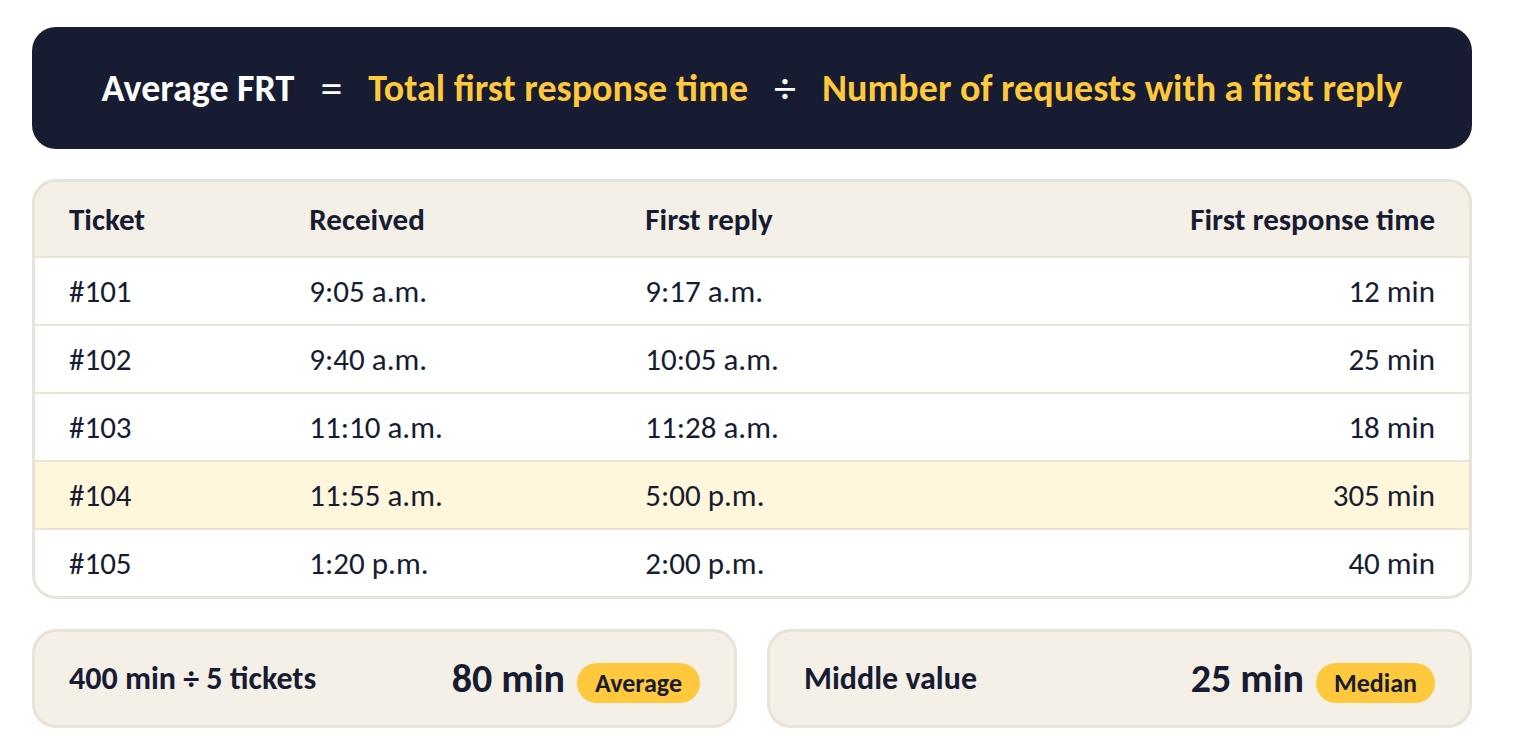
The First Response Time Formula
Add up the first response time for every request that got a reply, then divide by the number of those requests:
Average FRT = Total first response time ÷ Number of requests with a first reply
Calculate FRT separately for each channel. Mixing chat replies measured in seconds with email replies measured in hours gives an average that describes neither.
Requests that haven't had a reply yet don't have an FRT, so they stay out of the formula. Track them separately as an open backlog, since the oldest ones will push your average up the moment someone finally answers.
Many helpdesk and contact center tools calculate FRT automatically from ticket timestamps. If yours doesn't, export the time each request arrived and the time of the first agent reply, then subtract one from the other for every ticket.
A Worked Example
Say Megan runs a small support team and wants to check last Monday's email queue. Five tickets came in, and here's how long each one waited for its first human reply:
| Ticket | Received | First reply | First response time |
| #101 | 9:05 a.m. | 9:17 a.m. | 12 minutes |
| #102 | 9:40 a.m. | 10:05 a.m. | 25 minutes |
| #103 | 11:10 a.m. | 11:28 a.m. | 18 minutes |
| #104 | 11:55 a.m. | 5:00 p.m. | 305 minutes |
| #105 | 1:20 p.m. | 2:00 p.m. | 40 minutes |
The total is 400 minutes across five tickets, so the average FRT is 80 minutes. Four of the five customers, though, heard back in 40 minutes or less.
Average vs. Median: Which One to Report
In Megan's example, one slow ticket pulls the average up to 80 minutes, while the median (the middle value when you line the tickets up from fastest to slowest) is 25 minutes.
Report both numbers. The median shows what a typical customer experiences, and the average tells you when a handful of forgotten tickets is dragging the team down. A big gap between the two is a sign to look for tickets stuck in the wrong queue.
Business Hours or Calendar Hours?
Take a ticket that arrives at 5:30 p.m. on Friday and gets a reply at 9:30 a.m. on Monday. In calendar hours, the customer waited 64 hours, while in business hours (say 9 a.m. to 5 p.m. on weekdays) the wait was only 30 minutes.
Pick one method and state it in your service level agreement (SLA), meaning the response time your team commits to. Business hours are fairer to the team, but calendar hours show how long the customer actually waited, so many teams track both and tell customers their support hours up front.
First Response Time vs. Related Metrics
FRT is often confused with other support numbers that sound similar. Here's how the most common ones compare and when each is useful.
| Metric | What it measures | When to use it |
| First response time (FRT) | Time until the first human reply | To see how fast customers get acknowledged |
| Average response time | Time between every customer message and the agent's reply, across the whole conversation | To spot slow back-and-forth after the first reply |
| Resolution time | Time from the first message until the issue is closed | To see how long problems take to fix |
| First contact resolution (FCR) | Share of requests solved in the first reply, with no follow-up needed | To judge how complete your answers are |
| Average speed of answer (ASA) | Time callers wait in the queue before an agent answers | To track FRT on the phone channel |
| Service level agreement (SLA) | The target your team commits to for FRT, resolution time, or both | To set expectations and flag tickets at risk |
The metrics work best together. A team with a fast FRT and a low FCR is replying quickly but saying too little, so read FRT next to FCR and resolution time before deciding the queue is healthy. These numbers also show whether your wider customer service strategy is working.
What Is a Good First Response Time?
A good first response time depends on the channel, how urgent the request is, and when your team is working. A reply that feels fast by email would feel painfully slow in a live chat window.
Independent research gives a clear benchmark only for email, so for the other channels, use the pace customers expect as your guide and set the exact number with the five steps below.
Here's a quick look at how the wait feels on each channel and where to start.
| Channel | How customers experience the wait | Where to start |
| Phone | They're on hold and can't do anything else | Short queues and a callback option |
| Live chat | They're watching the chat window | Reply while they're still on the page |
| They check back later, but not days later | One hour during business hours | |
| Social media | Other customers can see the wait | A quick public reply, then a private message |
| Messaging apps | They expect a texting pace | Staff it like chat during business hours |
1. Phone
Phone is a live channel, so the first response is the moment an agent answers. Contact centers track this as average speed of answer (ASA), meaning how long callers wait in the queue.
Keep the queue short and offer a callback when waits get long, since customers on hold can't do anything else while they wait.
2. Live Chat
A customer who opens a chat window usually stays on the page and watches for an answer. Reply while they're still there, and if an agent can't take the chat right away, tell the customer how long the wait is instead of leaving the window silent.
3. Email
Email gives the team more room than the live channels, and it's also the one channel with solid data on what customers expect. In a 2020 survey of more than 3,200 consumers in the US, UK, and Canada, a one-hour reply met the expectations of 88% of respondents.
Treat one hour as a target to work toward during business hours. For evenings and weekends, set a fallback, for example first thing the next business morning, and say so in your auto-reply.
4. Social Media
A public post or comment is seen by other customers too, so a slow reply costs more than one person's goodwill. Reply publicly to show you've seen it, then move account details to a private message.
5. Messaging Apps
On WhatsApp, Viber, or Facebook Messenger, customers often write the way they'd text a friend and expect a similar pace. Staff these channels like chat during business hours, and set an auto-reply that says when a person will answer after hours. Keep in mind that the auto-reply doesn't stop the FRT clock.
Within each channel, urgent requests deserve a tighter target than routine ones, and the next section shows how to set both.
How to Set a First Response Time Target in 5 Steps
The one-hour email benchmark tells you what customers want, but it can't tell you what your team can reach next month. Build your own target from your data, then move it step by step toward what customers expect.
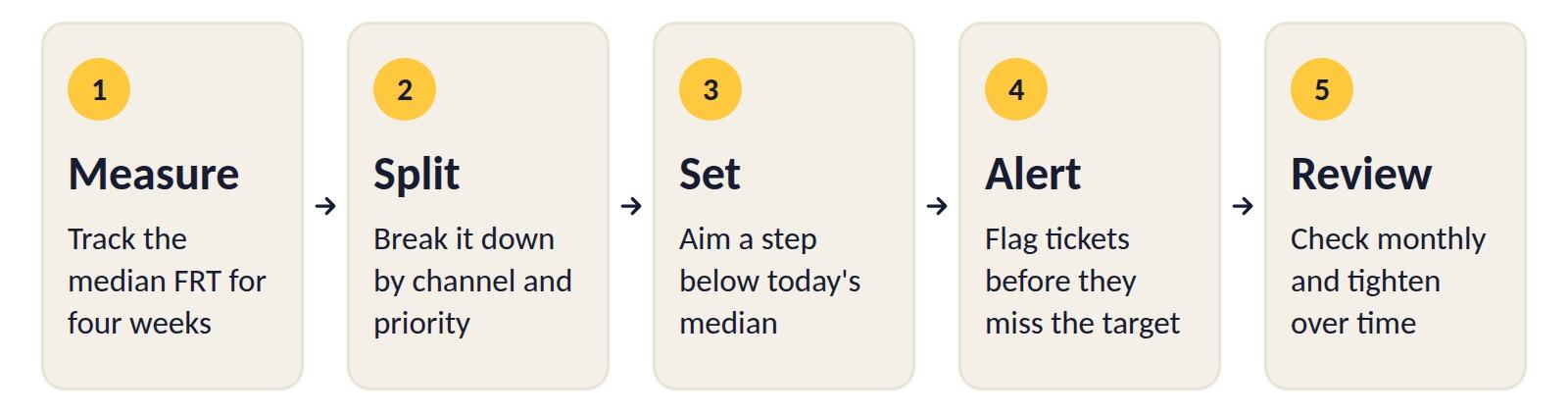
- Measure your starting point by tracking the median FRT for four weeks, so one unusually busy or quiet week doesn't throw off the picture.
- Split the numbers by channel and priority, since an urgent billing email and a general product question shouldn't share one target.
- Set a target a step below today's median for each channel and priority, then write it into your SLA as a share of tickets, for example 90% of emails answered within two and a half hours, so the slowest requests still count.
- Add an alert that fires before a ticket breaks the target, for example when an email has waited 45 minutes against a one-hour goal.
- Review the results every month, and tighten the target once the team hits it for two or three months in a row.
Tom, a support lead with a median email FRT of three hours, might start with a two-and-a-half-hour target, reach it within a couple of months, and then move to two hours, which keeps each new goal within the team's reach while email moves closer to the one-hour mark.
7 Ways to Improve First Response Time
Before asking agents to reply faster, look at how requests reach them, since a ticket sitting in the wrong queue often loses more time than the reply itself takes to write. Start with the fix that matches your biggest bottleneck.
1. Route Requests to the Right Agent From the Start
Every time a ticket is passed from one agent to another, the customer's wait grows. Route by topic, language, and skill so a billing question lands with someone who can answer it. For calls, skill-based and time-based routing gets customers to the right queue on the first try.
List the handful of request types that make up most of your volume, and assign each one to the agents who handle it best.
2. Sort the Queue by Urgency
A first-in, first-out queue treats a password reset and a failed payment the same way. Tag requests by priority as they arrive, and let agents answer the urgent ones first while the rest follow within the SLA.
Keep the priority levels simple and agree as a team on what counts as urgent, from service outages to locked accounts, so everyone tags requests the same way. Automated ticket tagging can handle the sorting as requests come in, so agents don't have to.
3. Prepare Templates for the First Reply
Agents lose minutes writing the same acknowledgment again and again. Keep a short set of first-reply templates for your most common requests, and change the name, the issue, and the next step before sending.
Cover the five requests that come in most often first, and review the templates every few months so they still match your current products and policies. AI in customer service can go a step further and draft the first reply for an agent to check and send.
4. Staff for Your Busiest Hours
Many teams see requests pile up at predictable times, for example Monday mornings or right after a product launch. Match shifts to your volume by pulling last month's tickets and counting how many arrive in each hour of the day.
Move breaks and meetings out of the busiest hours, and add a second person to any channel that regularly builds a backlog. Run the same check before seasonal peaks and product launches, when volume can jump well above a normal week.
5. Set Alerts Before the Deadline
An SLA only helps if someone notices a ticket about to miss it. Flag tickets at 75% of the target time so a team lead can reassign them while there's still time to reply.
Send the alert to whoever can act on it, usually the team lead on shift, and keep an eye on how often it fires. If the number keeps rising, the target or the staffing needs a second look.
6. Bring Every Channel Into One View
When email, chat, and messaging apps live in separate tools, agents keep switching tabs and one channel tends to get forgotten. Handle all channels in one interface so the whole queue is visible at once and nothing waits unseen.
On each shift, name one person responsible for every channel, so a quiet WhatsApp queue doesn't sit unchecked while everyone watches email. Connecting every channel into one conversation is also a key step to improve customer experience.
7. Answer Common Questions Before They Arrive
Questions about delivery times, returns, or password resets can often be answered by a clear help page. Check which questions agents answered most often last month, and write or update a help article for the top ones first.
Keep a knowledge base up to date and link to it in your auto-reply, so agents have more time for requests that need a person. A support chatbot can answer the simplest questions instantly and pass the rest to an agent, though its reply still doesn't count toward FRT.
4 First Response Time Mistakes to Avoid
Chasing a faster FRT can backfire when the number improves but the customer experience doesn't, and these four traps are easy to fall into.
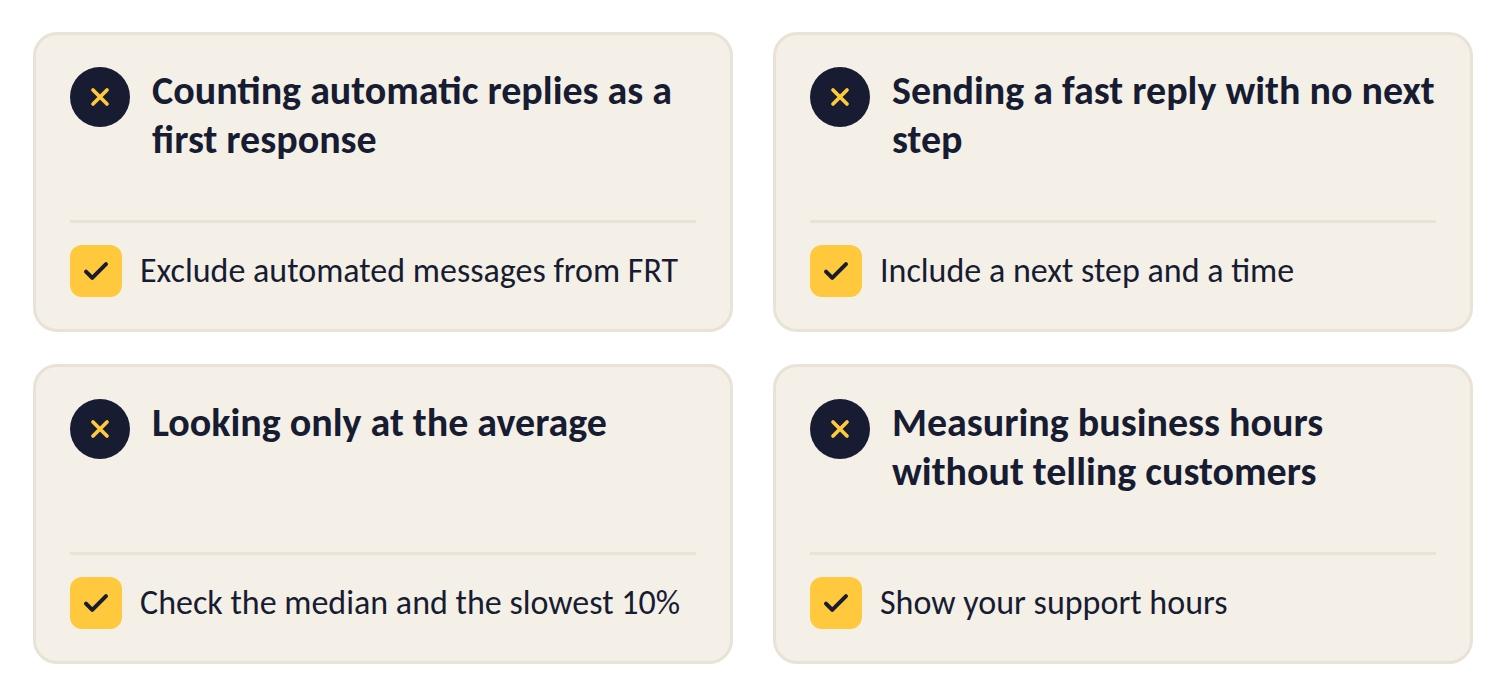
1. Counting Automatic Replies as a First Response
An instant "We've got your email" message makes the numbers look great, while the customer still waits hours for a person. Exclude automated messages from FRT, or the metric stops telling you anything useful.
2. Sending a Fast Reply With No Next Step
"We're looking into it" technically stops the clock, but it leaves the customer with nothing to hold on to. Include a next step and a time in every first reply, even if the full answer comes later.
3. Looking Only at the Average
As the worked example showed, a single slow ticket can pull the average far above what most customers experienced, while a decent median can hide the few customers who waited for hours. Check the median and the slowest 10% of tickets alongside the average.
4. Measuring Business Hours Without Telling Customers
A team can hit a one-hour business-hours target while a customer who wrote on Friday evening waits all weekend. Show your support hours on the contact page and in the auto-reply, so the wait matches what the customer expects.
What a Good First Response Looks Like
The strongest first responses confirm the problem, say what's already been done, and give a time for the next update, even when the full answer isn't ready yet. Here's a short email template that covers all three.
Subject: Re: [Original subject] [Ticket #12345]
Hi [Customer name],
Thank you for writing to us. I can see that [issue in one sentence], and I'm sorry for the trouble.
I've [first action, e.g., "checked your order and asked our warehouse for an update"]. I'll email you again by [day and time] with what I find.
Best,
[Your name] [Team name] | [Direct email or phone]
On live chat and messaging apps, keep the same three parts in a shorter form:
Thanks for waiting, [Customer name]. I can see [issue in one sentence], and I'm checking it now. I'll get back to you here within [time].
Replies to upset customers need a bit more care, and our guide on how to respond to a frustrated customer email has 12 samples for the most common situations.
How Nexios Helps You Track and Improve First Response Time
Improving FRT starts with seeing the whole queue and knowing where time is lost. The Nexios platform brings voice, video, email, SMS, live chat, WhatsApp, Viber, and Messenger into one unified interface, so agents don't have to switch tools to find out who's still waiting.
- Reporting and analytics let you build custom reports, add your own KPIs, for example FRT by channel, and follow them on a real-time dashboard.
- A ticketing system for your team's tasks keeps every request visible with custom views and advanced filtering, so nothing sits unanswered in a shared inbox.
- Mail categorization and email as a task turn every incoming email into a trackable item with a category and an owner, which makes sorting by urgency much easier.
- For calls, skill-based and time-based routing connects customers to the right agent and helps keep queue times down.
Nexios also offers an AI Email Assistant, built on the platform's in-house developed AI.
See how your team's response times could look in one view. Talk to our team
First Response Time FAQs
1. How do you calculate first response time?
To calculate first response time, add up the time each request waited for its first human reply, then divide by the number of requests that got a reply.
For example, five tickets that waited a total of 400 minutes give an average FRT of 80 minutes. Check the median too, since one slow ticket can pull the average up.
2. Does an automated reply count toward first response time?
No, an automated reply doesn't count toward first response time. FRT measures how long the customer waits for a reply from a real person, so auto-confirmations and chatbot greetings should be excluded.
Automated messages are still useful for confirming receipt and sharing your support hours.
3. Is first response time the same as first reply time?
Yes, first response time and first reply time are the same metric. Different support tools use different names, but both measure the time until the first human reply.
4. What's the difference between first response time and average response time?
First response time measures only the wait before the first reply, while average response time covers every reply in the conversation.
A team can have a fast FRT and still frustrate customers if later replies take days, so track both.
5. Should weekends and holidays count in FRT?
Weekends and holidays count only if you measure in calendar hours. Many teams measure in business hours for internal targets, while also checking calendar hours to see the wait from the customer's side.
Whichever you choose, write it into your SLA and show your support hours to customers.
6. What's a good first response time for email?
A good first response time for email is one hour during business hours, if your team can reach it. In a 2020 survey of more than 3,200 consumers, a one-hour reply met the expectations of 88% of respondents.
If you're far from that today, set a target a step below your current median and tighten it every few months.
7. How can you improve FRT without hiring more agents?
You can improve FRT without hiring more agents by removing the delays that slow the current team down:
- Route requests to the right agent from the start
- Sort the queue by urgency
- Use first-reply templates for common requests
- Move shifts and breaks around your busiest hours
- Answer frequent questions in a knowledge base
- Set alerts before tickets miss the SLA
Get free insights via email
Practical support insights on service metrics, AI and the playbooks teams actually run, straight to your inbox. Free, unsubscribe anytime.